
If you are new to Instagram or planning to convert your personal account to a business account, this is your complete beginner's guide for 2025.
A good Instagram marketing strategy for your business complements your content marketing strategy to generate high quality inbound leads.
Instagram has been around since 2010 and especially in the last couple of years, new features and functionalities have been sprouting up.
If you are a newbie, it will take a while to figure out the ins and outs of tapping into this social media tool.
Nonetheless, this back-to-basics beginner guide is a great resource to navigate you through the Instagram maze.
I'll be covering the basics like getting you familiar with the terminologies and how to use Instagram posts, Stories and Highlights to tap into the power of this visual social media network, attract qualified leads and turn them into paying customers.
Since I first published this article, Instagram (Business Account) has evolved with new features that includes Instagram Reels (short clips meant to compete with TikTok) and Guide. I will briefly cover them in this article as well.
Latest update 20 October 2021: Instagram TV (IGTV) - the vertical form video initiated by Instagram presumably didn't go down well with the crowds. As such, IGTV will be merged together with video posts and it will be called Instagram Video. Reels will also be allowed to upload to Stories.

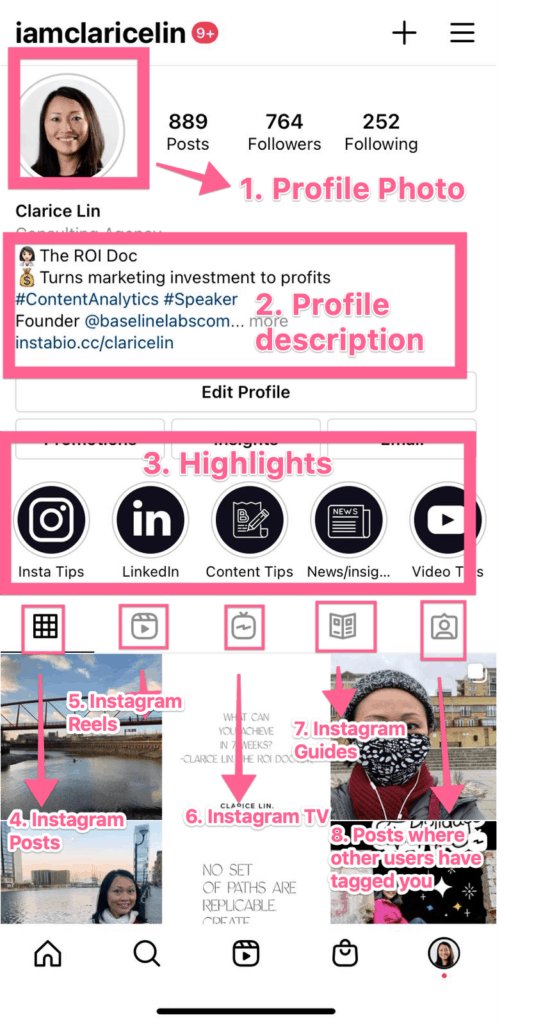
Anatomy of an Instagram profile
On your Instagram profile page, users will see your profile photo, profile description, highlights, posts, videos posted on Instagram TV and the posts where other people have tagged you.
These are the main parts on your profile page that you would be updating on a regular basis.
Optimal size of your Insta profile picture
Upload a minimum image size of 110 x 110 pixels for your profile photo. If you want your photo to look sharp, the ideal photo size is 180 x 180 pixels.
Anytime you want to update the photo, click on "Edit Profile" on your profile page. You'll be able to change your profile photo, name, username, your profile description that includes a bio and a link, business information and private information.
Updating your profile description
When you click on "Edit Profile", a page pops up where you can update your bio. The character limit is 150 and you can include a mix of words, hashtags or emoticons.
In this bio, think about what keywords people will look for when they search for products or services you have.
If you put in emoticons, it injects a fun element to your brand.
On your Instagram profile bio, you are now allowed to add up to 5 links since early 2023!
It could be any 5 links ranging from your blog posts, videos or your website or the link to your e-commerce store.
Alternatively, if you want to spruce up your bio by having more than 5 links, there are services like Linktree where you can create a bio link that comprises of well over 5 links.
You can also set up one simple landing page on your website with link buttons to a number of pages you want to share with a profile visitor.
Personally, I don't encourage having more than 5 links. Thing is, when you give your audience too many options, it becomes difficult for them to follow your guided path to eventually buy your products or work with you.
Too many links can become very distracting, diluting the attention from your key products or services.
What you can include in your business information
There are three parts in this section namely Page, Category and Contact options.
Page
If you have an existing Facebook page, you can connect your Instagram account to that page. This will help you to create Instagram advertising campaigns through your Facebook ad account.
Also when you create Instagram stories, you can also share the same stories to your Facebook Stories.
Category
Category refers to the industry of your business. When you select the right category, this makes it easier for Instagram to place your content in the right group on the Explore page.
Contact options
What you select in this section will determine how a prospect will contact you when they find you on Instagram. You can either add your email or your telephone number or both. If you have a physical store, you can key in your address too.
There is also the option of adding an action button where you connect your Instagram profile with other online services.
Example: you can connect and sync with your Acuity Scheduling software for someone to book an appointment or sync with your Eventbrite account if you are selling tickets for an event.
Your private information
What are Instagram Hashtags?
#hashtag was born in the 21st century.
At the beginning, it was mostly associated with Twitter and was meant to link buzz around the same topic on the platform so others can follow or join these conversations.
Fast forward to today, it has become so useful that it has been successfully adopted across other platforms like Instagram and LinkedIn. (Unfortunately it didn't work so well on Facebook.)
Hashtag is akin to "google search engine" on the social media platforms.
If you are running a business, using the right hashtags on Instagram will help new people discover your content (provided you are ranking for them).
Side note: The same hashtags that works well on Twitter might not be your key to success on Instagram.
Following Hashtags on Instagram
There are well over 2 billion monthly active users on Instagram and over 500 million daily active Instagram Story users worldwide.
Apart from following individual accounts, these users are able to follow hashtags they are interested in. This means posts and stories with these hashtags will be shown to this group of followers.
This is how the "profile page" of the hashtag #mondaymantra look like. It is almost the same as the profile page of an user.
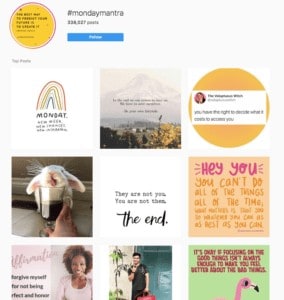
People who tag their posts with #mondaymantra, their posts will appear on this page. Similarly, these posts will also appear in the feed of the followers.
If a story is tagged with #mondaymantra, it will be added to the stories - indicated by a pink circle around the #mondaymantra "profile page".
Anyone who is following this specific hashtags will see those content shown in their home feed.
Hashtags help users to find things they care about or want to know more about.
Tagging your content with the right hashtags help these users to discover your brand and your content.
Hashtag Research
There are many tools that you can use to research for the right hashtags. If you don't have a budget for research, this is what you can do instead. First, launch your Instagram app.
For instance, I want to look for other related hashtags that I can use together with #mondaymantra. I go to the search page and key in the hashtag. Then I click to go to the "profile page" as seen below.
The Hashtag page is divided into three parts:
- The "profile photo" and the follow button
- Row of text beginning with "Related"
- Two tabs : "Top" and "Recent". In the first tab, 9 posts with the highest engagement are displayed. While in the second tab, any posts that has the #mondaymantra hashtag is displayed in chronological order.
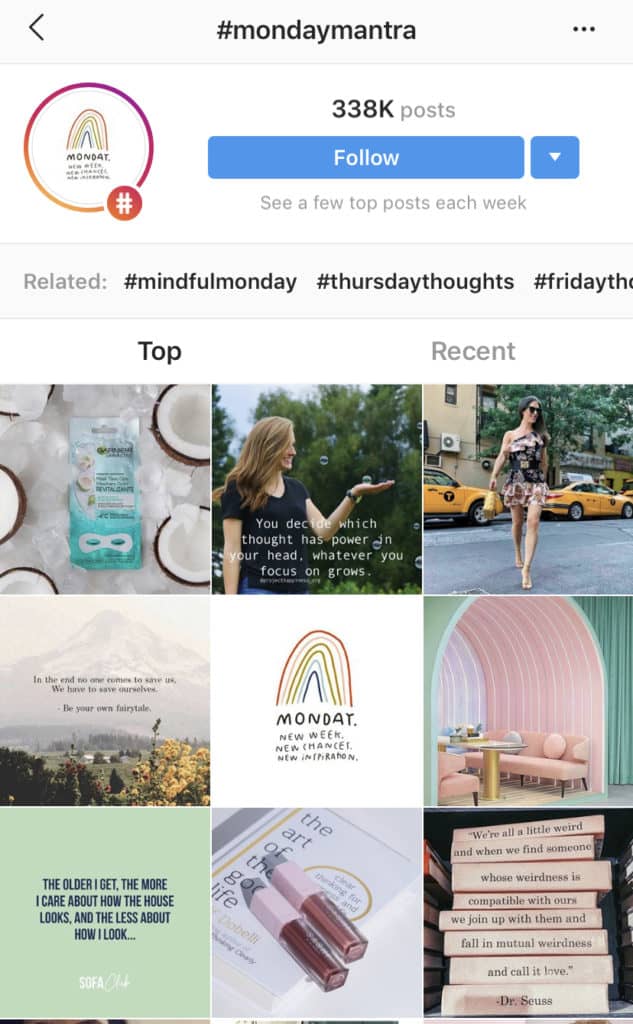
Right below the follow button, there is a row of text that starts with the word "Related:".
The hashtags right behind that word are other associated hashtags that people would use together when they use the hashtag "#mondaymantra".
This is a free method for your research but it requires some time commitment to unearth the associated hashtags.
Another method you can employ is to check out each of the (9) top posts under the tab "Top". Take a look at what other hashtags the owners has included as well.
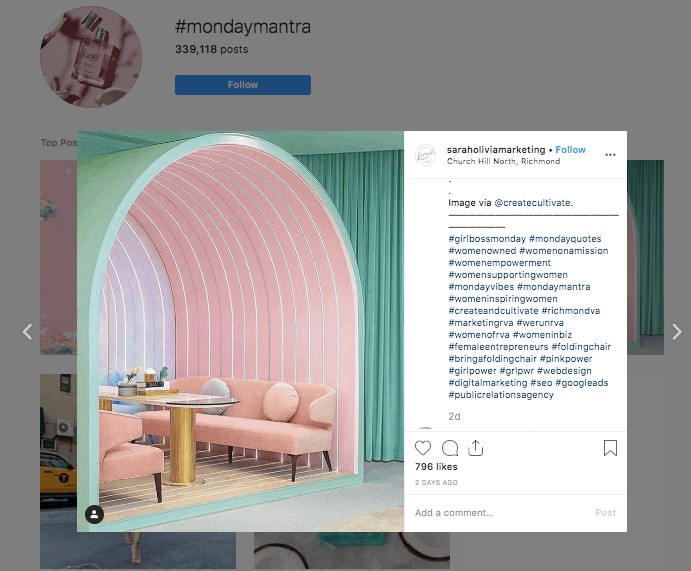
In the screenshot below, in the first row, third column, let's take a look at what other hashtags the user has selected. The post has garnered 796 likes and 19 comments so far.
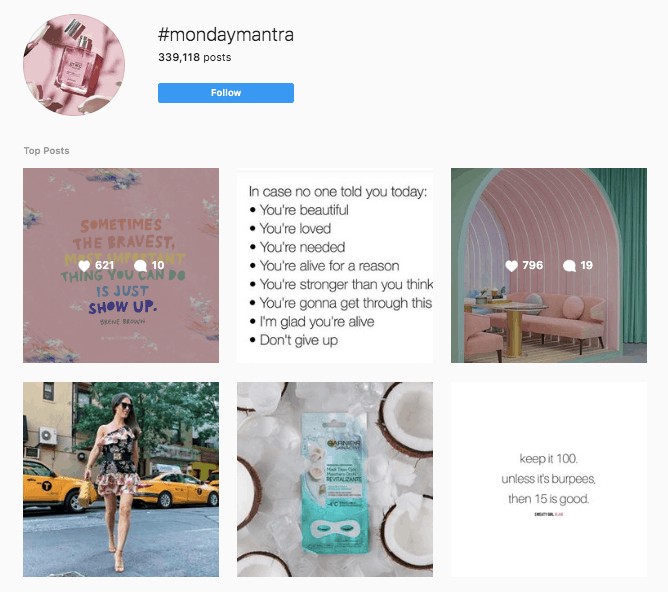
I click on the post to view the details. You can see the other hashtags used like #mondayquotes, #mondayvibes, #girlbossmonday etc.
For all relevant looking hashtags, save them in a notepad or better still, an excel sheet making it easier for you to organize the information better at a later stage.
When you have collected a list of related hashtags, search for each of these hashtags and learn what other users have been posting under the specific hashtag.
If the hashtags are used by other accounts that are not aligned with your brand theme or it has a different meaning from what you expect, eliminate it from your list.
Using the right hashtags
The other piece of information you ought to take note of is the number of posts that have been published under each of these hashtags. You want to use a combination of hashtags type that fall under these categories.
- just over 1 million existing posts
- between 500K to 1 million posts
- between 100K to 500K posts
- 10K to 100K posts
- 1,000 to 10K posts
If a hashtag has 2 million or more posts, chances are many people are regularly using it. That means once you publish a new post, it will rapidly be buried under other new posts, making it difficult for others to discover your through this hashtag.
Conversely, if a hashtag has under 1000 posts, this suggests not many people are aware about this hashtag and not many people are using or following it.
So when you use this hashtag for a new post, the probability of someone discovering it is also low currently but if usage continues to grow, you could be dominating this space (in the future).
So, when does Instagram not work for you?
No hashtags
When you don't use any hashtags for your posts and stories, it's extremely challenging to grow any followers. Especially if you are new to this space, the number of accounts have reached saturation point.
It's a stiff competition to get your content in front of your followers.
If you recall back in the early days, it was easy to get followers for the Facebook page, today it's almost like climbing Mount Everest.
Without hashtags for your post, you might as well not post anything because it's a waste of your efforts. If not enough people like, comment or share your Instagram posts, then the algorithm wouldn't be triggered and your post will not be seen by other followers.
Including hashtags is one of the best way to grow new followers and extend your reach.
Wrong hashtags
What happens when you use the wrong hashtags? Your content will likely appear in front of the wrong audience and it will not be appreciated.
It will result in no likes, no comments and no potential prospects.
Similar to using no hashtags, using the wrong hashtags also becomes a waste of time for your business.
Too many hashtags
When your post has too many hashtags, it becomes challenging for Instagram to place your content under the right buckets and show it to the right people.
Previously, it was encouraged that Instagram content could have up to 30 hashtags and that would help with getting your content discovered more easily in the right categories.
That would result in higher discoverability in the Explore tab and attracting new users to find your content.
However, today only 3-5 hashtags are encouraged as this would less likely dilute the attention and boost the accuracy of content categorization.
Type of Industry you are in
For some instances, Instagram is a more suitable social media platform than others. Because this is a very visual platform, it's more suited for a business in the fashion, beauty, fitness or travel industry.
If you are selling consumer goods, this is also an awesome channel to showcase your products.
In some cases, you can even select and work with influencers to promote your products. It's like hiring a brand ambassador for your brand.
However, if you don't fall into any of those categories, don't panic.
This visual-focused platform is also useful for growing your personal brand when you share your day to day with your followers to cultivate trust.
Apart from Hashtags, now you can also rely on Keyword Search to be discovered on Instagram
So, Instagram has upgraded its Search Feature! This is another new capability rolled out towards the end of 2020.
Previously it was only possible to search by username, profile names, hashtags and location...but now,
you can search by specific keywords!
It's one additional way to search for content you love on the visual social media platform.
For example,
instead of #weekendvibes, you can now search for "weekend vibes".
That means you don't necessarily need to add every possible hashtag variation for your posts to get maximum visibility.
As long as you use the specific keywords in your caption, that should likely be enough to help people find your content.
📍 Note: Not every niche keyword and topic will be searchable in this way.
Currently it's "limited to general interest topics and keywords that are within Instagram’s community guidelines”.
Instagram has also said, to get a high ranking in the keyword search, they consider "a number of factors" that includes "type of content", "captions" and date posted to display the most relevant results for the users.
In my personal opinion, I'm guessing adding related "alt text" to your images could possibly increase your chances of showing up too. 😁
The next time you create that Instagram post, add related keywords as "alt text" for your visual and don't forget to add on as a caption to up your chances of discovery by potential new followers.
Can you add text on visuals?
Although users on Instagram is very much into visuals - like images and videos, quotes creation is also very popular.
People love quotes on Instagram (and Facebook too!). Motivational, inspirational, insightful and provocative quotes get high engagement on Instagram.
Users turn to this colour-infused platform to get an "encouragement boost" or "dopamine hit" to get them going.
Quotes are extremely well-received because people want to know they are not alone - in whatever they do and they enjoy tapping on the "like" button to indicate a "me too!".
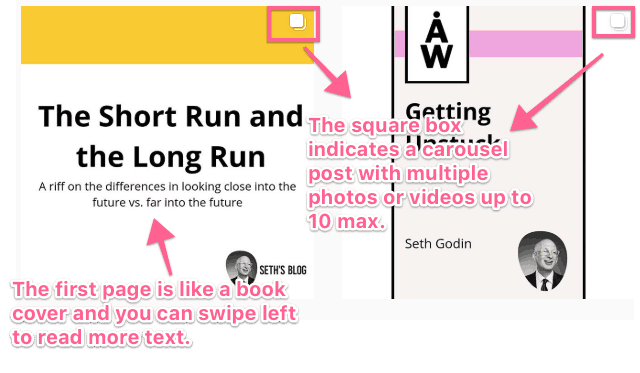
Something new that has started trending - a "text" story or otherwise what I call a "mini-book". Essentially a person can share a mix of up to 10 photos or videos as a single carousel post that friends can swipe through.
Seth Godin - the marketing guru is doing that right now on his Instagram account. He keeps his captions short and sweet and distributes the text on multiple photos.
Create a consistent look and feel for your content
When you use Instagram to expand your audience's reach, one of the underlying success factors is to create a consistent look and feel.
In other words, it's about building a recognizable brand that fosters trust.
That's where templates come in. Especially on your main profile page, the colours and fonts and design have to be uniform - to a certain extent.
Let's say if you publish regular quotes, the quotes should have a consistent look and feel so anyone who is following you is able to spot it immediately.
Integrating your brand colours similar to what's on your website and other social media platforms is also crucial because you want your brand to pop up first in people's mind when they see those colours.
Tools to create your Instagram Brand Templates
If you are great in design, you can use tools like Canva or Affinity Photo or Photoshop to build your own brand templates. All three of them have apps you can download to edit photos on your mobile.
In particular, Canva also offers a library of handy photo collections to use in your design.
Instagram Template Marketplace
There is also the option of purchasing a set of template for a consistent Instagram branding look and feel.
Creative Market offers a wide selection of Instagram posts and Stories template you can select from and they also offer templates for Facebook, Pinterest, SnapChat and Twitter.
Design Shack is another option you can look into by industry type. Whether you run a fitness. charity, ecommerce or travel business etc, there is a wide array of options for you.
Publishing content on a regular rhythm
Publishing your content on a regular basis is also another success factor for growing your Instagram following. The lifespan of each Instagram post last about a couple of days so your content can easily RIP (rest in peace) without anyone noticing.
Instagram's algorithm works in such a way that when your follower likes or comments on your post, the relevance score of your content to them goes up.
So, the next time when you publish a post, the algorithm will mostly show your post to them again!
When you stop publishing, your relevance score declines and when you put out a new piece of content, it's less likely to be shown to them.
The more interaction your follower has with your content, the more familiar they are with your brand.
And this increasing familiarity breeds trust!
The difference between an Instagram Post and an Instagram Story
People new to Instagram scratch their head when I tell them about Instagram posts and Stories. They don't quite know when Stories fit in when they have already published posts on their main feed.
Stories is a channel for peeking behind the scenes - when things are in motion, when you are preparing for an event, your preparation before a big product launch etc.
Whereas posts are a way to showcase the end of an event or a momentous moment - like a big photo take to round up an occasion.
Let's say you have a big day out. Whereas you might share a number of interesting photos
In the past, Stories only last for 24 hours. However, Stories can now be viewed after 24 hours if you save them under Highlights - which you can see on your main profile page.
Stories that are more than 24 hours old and not saved in your Highlights will be archived.
A new function on the Instagram app now allows you to re-share a story you've created one year ago on the same day.
Creating Instagram Stories
It's very difficult to get in front of your audience if you are only scheduling normal posts. A good Instagram Story strategy complements and drives more eyeballs to discover your brand.
Instagram Stories are not limited to still photos and 15 second video clips. The photos and videos can be taken beforehand using your mobile phone camera and you can upload to Stories at a later time.
You can use standardized templates to create behind-the-scenes content and best part is, they don't need to be picture perfect.
Stories effect: Boomerang, Face Filters and Superzoom
Within the Instagram app itself, there is also the option of creating Stories made up of Boomerang, face filters and superzoom effects.
Within the Superzoom feature, Instagram offers 6 effects Paparazzi, TV Programme, Dramatic, Beats, Fire, Hearts, Nope, Bummer, Bounce and Surprise. They are used to illustrate the feeling through colours and sounds when a picture is zoomed in.
Sharing your Insta posts as Stories widen the reach to potential new audience especially when you use relevant hashtags for discovery purposes.
Within a single story, you can use up to 10 hashtags and one location while an individual post allows you to add up to 30 hashtags and one location.
Using Stickers In Instagram Stories
One of the prominent features in Stories are the Insta Stickers! These stickers aid in content discovery and boost audience engagement and interactions.
Location Sticker
The location sticker is most essential for a local business. If you take a photo at where your business is running, tag the exact location or the area of that location.
Someone living in that area who doesn't know about you but is following the location hashtag will help them discover you!
If you are a personal brand, it might not be such a good idea to tag your home location but rather widen the circle of your physical location for your personal safety.
If you are traveling from place to place, tagging the location will help people who are interested in those places to stumble onto your content.
Hashtag Sticker
As I mentioned earlier, the maximum number of hashtags to use with each story clip is 10. The main hashtag sticker could be formatted by colour - either transparent background, rainbow fonts with white background or pink fonts on white background.
After typing in the text for the hashtag, tap on it to look through the colour selections to make your final desired colour.
If you want to use up to 10 hashtags, insert text and type in "#" before you key in each name.
Tag Sticker
The tag sticker allows you to tag another user. If you are promoting a product, you can use this to type in their name and add them. Similar to the hashtag sticker, there are three colour options for you to choose from.
You can use as many tag stickers as you want - for example if you want to tag multiple friends in a photo.
GIF Sticker
I call the GIF sticker the fun sticker! GIF brings another dimension of life into your stories. It could be a simple animated call to action sticker or a dance GIF or sunset GIF - this Giphy integration with Instagram truly personalizes your stories!
If you want to promote your brand, you can also create your own in Giphy and upload them to Stories!
Interaction Stickers
Countdown sticker
This is the perfect sticker to share a product launch, a birthday giveaway, an upcoming event or a special anniversary. After selecting the countdown sticker, click on the color wheel to choose your desired colour and give this countdown a title.
Then choose the event date by scrolling the day, month and year option. If your event takes place at a specific time, there is the option to choose the specific hour and minute.
Let's say if you have an event in 2 weeks time, and you plan to promote it every few days on stories, adding this sticker to each helps to keep the date in their mind.
Also, your audience can "subscribe" to this countdown so they will be notified when the day arrives.
Question Sticker
The sticker that pulls your audience into a conversation. The question sticker is the perfect chance for them to ask you a question, or express their thoughts about an issue that you feel strongly about.
It's also great if you want your audience to share with you their favourite ice cream flavour or simply how they celebrate their birthday.
For any question that is open ended - use this sticker! You can choose to either share the answers publicly on stories or DM the folks individually within the next 24 hours - totally up to you.
Polling Sticker
Whether you want your audience to make a guess between two options or help you make a decision between a strawberry smoothie or a banana smoothie.
After 24 hours, you can share the results of this polling sticker as a new Story - whether it's a draw at 50-50 or 80-20 - this is a great opportunity to get your followers' opinion.
Emoji Slider Sticker
If you want to find out exactly how your audience feel about something - like how much they 💙 a city you are visiting right now or how much they 😍 your newly launched product.
The emoji you pick for your question layers on an additional element of emotional context.
When users see your story then drag the emoji to the left or right, it will animate and show them the average of how others have responded so far.
Quiz Sticker
Quizzing your followers can be used to hold a competition when they select the right answer you've pre-chosen in advance. Example, the first 10 people who get this right will get a special prize or discount.
It's another interaction opportunity and a chance for your audience to pay attention to the content you put out.
When someone answers a unique quiz question and review the answer options, it gets their attention, and makes them pause and think. By increasing the interaction time, it helps to cement your brand into their mind.
Chat Sticker
Group conversations are becoming a thing over the public commenting and replying threads. When you add a chat sticker to your story, you can approve respondents who tap on "Join" to add them into a direct messaging group.
It could be a special announcement meant for a specific group of people or creating an intimate circle for a one-time event, this group chat feature creates exclusivity and enables you to gather the engaged folks into a group chat.
Donation Sticker
If you have a vested interest in supporting your charity that forms part of your branding, this is the perfect chance to rally your audience. This donation sticker feature is currently only available in United States and United Kingdom.
After you select the charity and put it into your story, your followers have up to 24 hours to make a donation without leaving the Instagram app. It's pretty neat as the amount you help to raise goes directly to the charity.
Especially if your audience has a personal interest in the same charity as you, the common interest helps to forge a closer bond.
Music Sticker
This is a relatively cool feature that is unfortunately not available for everyone due to regional limitations and music copyrights.
However, if this feature is available for your Stories, you can select and add a song of your choice by searching through genre, mood, song title or artists names. Then you can further decide on the length of the music clip you want to repeat on your Story clip.
For some song selections, you have the 2 to 3 snippet options to select from or you can just go with the default snippet that has been selected for you.
How do you use Instagram Highlights?
Instagram Highlights are like categories to give your audience a glance into your business through Instagram Stories. For example, if you have ongoing events, stories of the events can be saved under a Highlight called Events.
Or if you share regular recipes, you can save all recipe stories under a new Highlight called Recipes.
If someone new follows you on Instagram, they can still check out your old stories and get you to know you better under the various Highlights categories.
Instagram Live
Livestreaming on Instagram is known as Instagram Live. People love live interactions. It's like going to watch your favourite singer perform live and soak in the atmosphere in real time.
Personally I find it more engaging when everyone is commenting at the same time and if the host of a live stream answers my question almost instantaneously.
The instant gratification narrows the physical distance between your audience and your brand. When you go live on Instagram, you can add filters and also allow your live audience to ask you questions in real-time.
At any one time, you can go live up to 60 minutes before it gets cut off. For a longer stream, you'd have to go live again.
Once your live video has ended, there is an option for you to share a replay of it to your Story. And of course, the live video will expire after 24 hours.
What is Instagram TV (IGTV)? And what has happened to it? (Updated: 20 October 2024)
Now you've learned about Instagram posts, Stories and Live, it's time to dive into IGTV- the video platform on Instagram.
The objective of IGTV is very much similar to Youtube. It allows you to showcase long-form videos without having to go live (i.e. Instagram Live).
The maximum length of a video post is 60 seconds while each Story clip lasts for 15 seconds. On IGTV you can upload videos up to 60 minutes long. The video can either be in landscape or vertical format.
Your videos' size should be between 1080px by 1920px (vertical) and 1920px by 1080px (landscape) else you won't be able to load them up.
You can choose to upload a thumbnail size of 1080 x 1680 pixels for your video else Instagram will just select the first frame as the preview image.
After you upload your video, you have the option to create a preview post of the first 60 seconds (of your IGTV video) so it shows up in your profile feed.
However, it might not have been very well-received and the popularity never exploded.
What is Instagram Video?
On October 5, 2021, Instagram made an official announcement to "retire" IGTV and combine it with the normal video posts.
This "new combined" feature is called Instagram Video or now better known as Instagram Reel.
It's a now a dedicated Instagram Reel section on your main profile page
When you upload any new videos, they will appear under a new Reel on your profile, making it easier for people to discover new video content.
The New Instagram Guide (Updated 27 October 2024)
(As of December 15th, 2023, Instagram Guides has been removed as a feature from Instagram due to likely low engagement and usage.)
This is a relatively new-ish feature that was pushed out to business accounts in late 2020.
Instagram Guide is akin to a special themed feature portfolio that you can create. You are not creating anything from scratch like what you would do for Posts, Stories and IGTV.
Rather you are simply stringing together a series of Instagram posts that forms part of a theme.
What you do is, first, decide on a theme relevant to your brand.
Then go back to review your existing posts on your profile and decide which posts will become a part of this theme.
After you create a guide, you select those posts and then fill in the gaps.
Mainly, you need to craft a title for your guide, relevant subheadings, and a title (and subtitles) for each post you've added.
Together those subheadings and subtitles should be telling a coherent story that explains what your guide is all about.
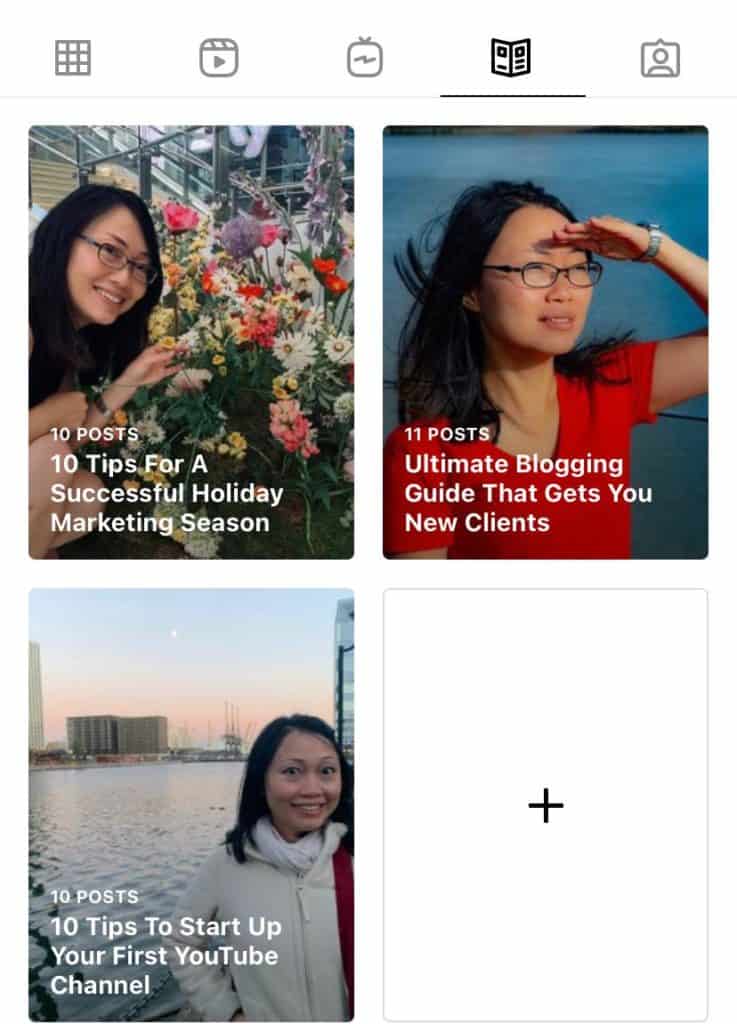
For clarity purposes on how Guides would look like on your profile, check out my screenshot below:
- 10 Tips For A Successful Holiday Marketing Season (10 Posts)
- Ultimate Blogging Guide That Gets You New Clients (11 Posts)
- 10 Tips to Start Up Your First YouTube Channel (10 Posts)
The New Instagram Reels
Reels is Instagram's answer to TikTok's (threat of) short-form videos. Similar to stories, Instagram Reels are meant to be viewed vertically, full-screen, and on mobile - that means a dimension of 9:16 is the best way to create your optimal video experience.
The length of a Reel has to be a minimum of three seconds, up to a maximum of 3 minutes. Uploading a Reel requires you to select a cover thumbnail that would double up to display as an Instagram preview Post.
Instagram is pushing strongly on Reels and have been prioritizing Reel content in the feed. I highly recommend you to mix up your content types and plan in Reels as part of your social media content strategy.
You can also promote your Reels by sharing them as a story to widen their reach.
Reviewing Instagram Insights
I've covered most of the ins and outs of using Instagram to promote your business.
In this last section, I'm diving into how to use Instagram insights to track your progress and your efforts towards using this visual platform. Within the Instagram app, there are two ways to view your posts' performance.
On the top right-hand corner, there is a three line icon. Tap on it and a navigation bar will slide out.
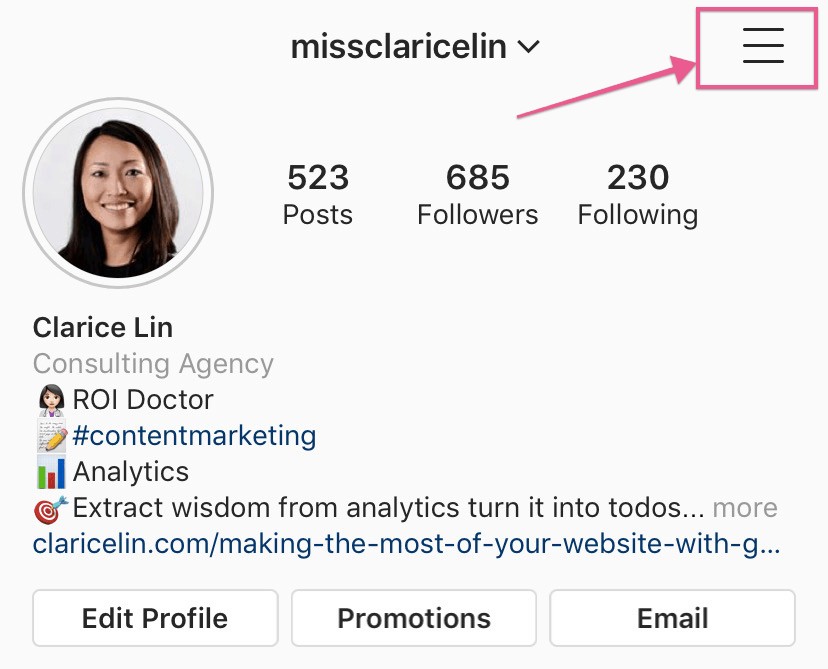
Look for "insights", then tap on it.
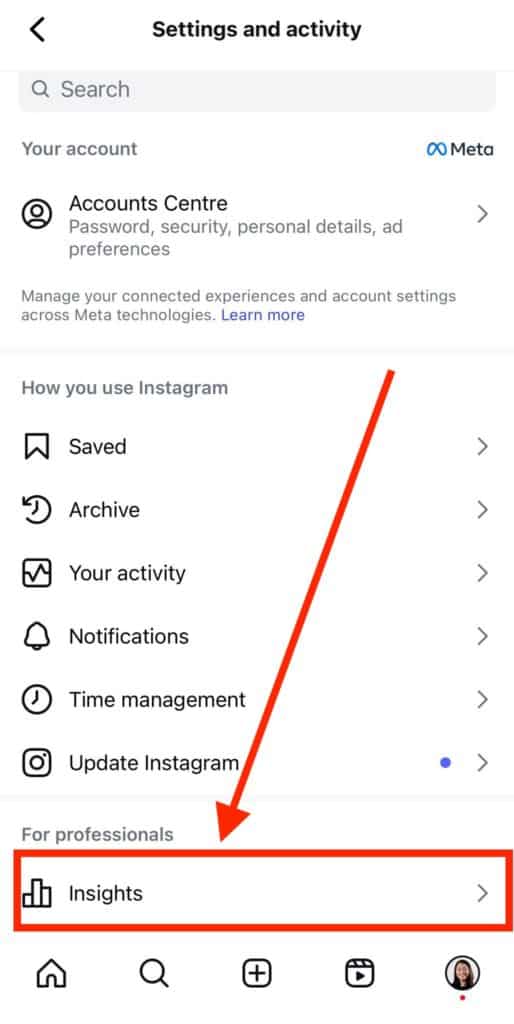
A full insights report will be loaded as seen below.
For the default selected date range of last 30 days, you'll see 4 sets of metrics: Views, Interactions, New Followers and Content You Shared.
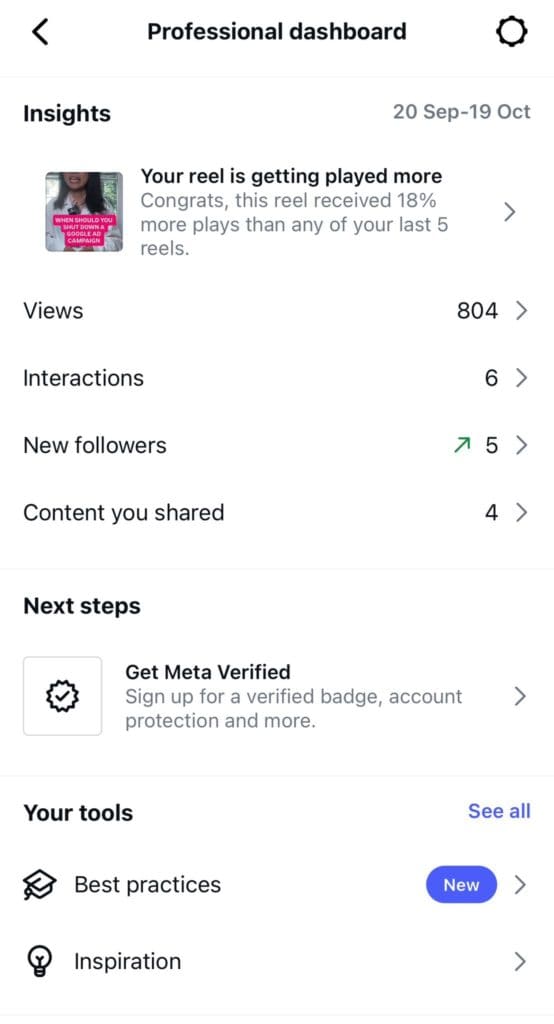
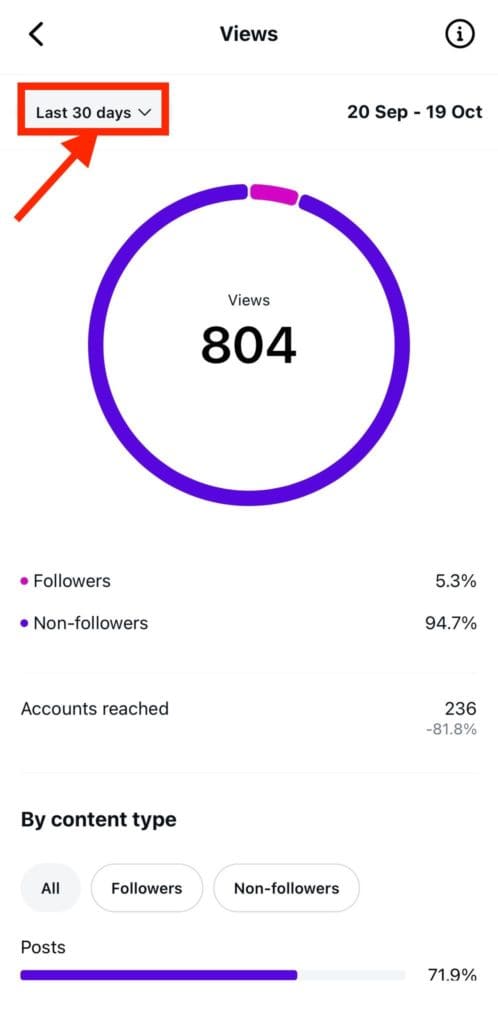
When you clicked into the Views section, it shows how many accounts have "seen" your content broken down by Followers and Non-followers in percentage. It will also show you the total number of Accounts reached.
You'll also see the views split by percentage across the type of content you've shared: Posts, Reels, Stories and Videos.
There is also Views by top content and it will see number of views each content has.
There is also views split by Audience and details are given at town/cities level and also at country level.
The information is also given at age range and gender.
If you want to change the date range (instead of the default 30 days), click on Last 30 days on the top left hand corner. A dialogue box will pop up up and you can select "Last 7 days", "Last 14 days", "Previous month", "Last 90 days" or make your custom date selection.
For insights into individual posts, click on "view Insights" under each image.
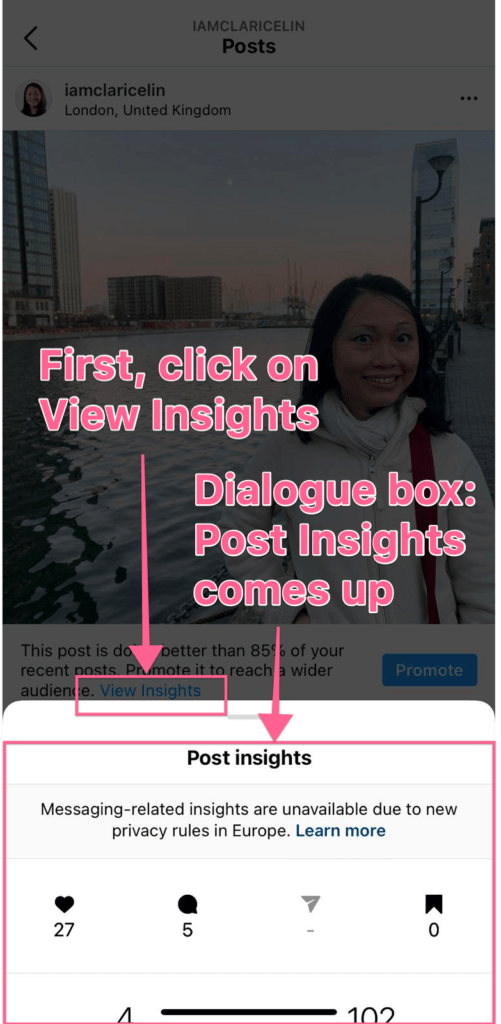
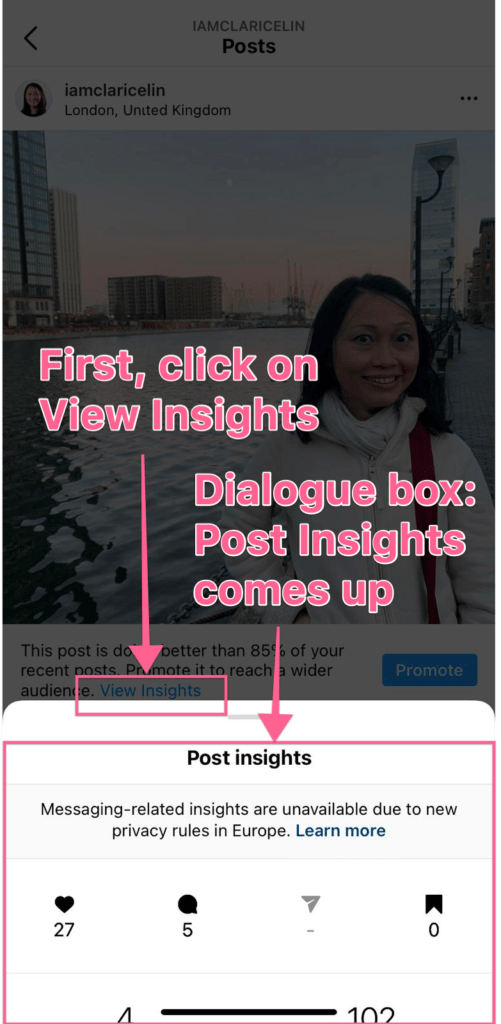
A Insights panel slides out from the bottom (of the post), displaying the total number of likes, comments, shares, saves, profile visits and reach of this one post.
If you Swipe up the panel and you'll see details of two other report sections: Interactions and Discovery.
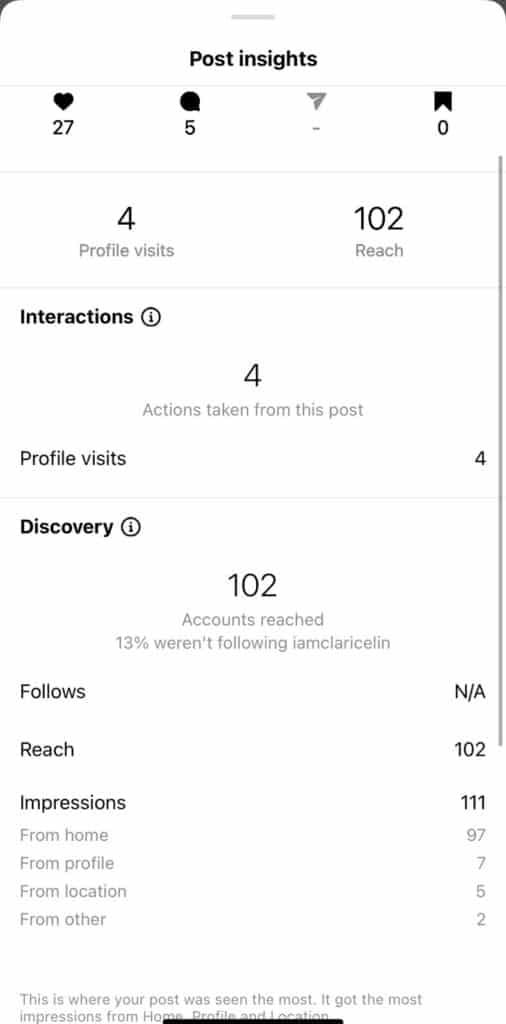
Under Discovery, you can view the breakdown of the total impressions: whether a user found your post through their home feed (if they are already following you), the hashtags you've used, directly from your profile or from other locations.
This is especially useful if your account is fairly new and you want to confirm if you are using the right hashtags to attract the right group of users.

Making the most of your website with Google Analytics
If you are a small business owner who is paying a monthly cost for your website and spent money building it up, installing Google Analytics tracking is mandatory.
Google Analytics isn't just meant for the big corporations - it's a web analytics tracking tool meant for any business who is serious about generating more revenue and hot leads with the website.
Table of Contents
- Why Google Analytics?
- Google Analytics For Small Business
- Your website is a core part of your business.
- How Google Analytics can boost your revenue numbers
- Making the most out of Google Analytics reports
- Stop the guesswork in your business
Why Google Analytics?
It's free. Google offers this tool with basic functionalities for small businesses. Google bought developer Urchin in 2005 and it has evolved very quickly over the years.
It's one of the early web analytics tool and the most widely used in the market. Hence, there are more people skilled in implementing and using this tool so it's much easier to look for help and resources online.
In the early days, Google Analytics was completely free and when they started developing new advanced features, they began targeting the large enterprises with premium support and features.
Not to mention, Google also offers training courses and certification to ensure the quality of the individuals.
Back then, another big player in the market was called Omniture - it has since been bought and rebranded under Adobe Analytics. It targets bigger companies with large volume of traffic - and of course they offer premium pricing.
Other players in the web analytics market include
for small and medium sized businesses
- GoSquared - free for under 1000 pageviews per month
- Matomo - minimum of 19 euros per month for 50,000 pageviews per month
- Open Web Analytics - it's free but it's based on open source code for the geeky analyst. If you aren't tech-savvy, this is not for you.
- Clicky - free for up to 3,000 daily page views. But they only offer the basic reports compared to Google Analytics.
- Gaug.es - minimum of $6 per month for 100,000 pageviews
for enterprises with large volume of traffic
- Foxmetrics - start from $250 per month
- Woopra - free up to 500,000 actions per month but it doesn't offer advance reporting features.
- Kissmetrics - customized pricing only based on customers' needs
- Adobe Analytics - customized pricing
The less well-known the product, you are more dependent on the supplier and this requires you to keep a significant budget for it.

Google Analytics For Small Business
The one and only goal of installing Google Analytics for your website is to generate more revenue and attract more customers. Full stop.
As a small business owner, you have limited time and resources. It is imperative to make sure you are spending your precious time and monies on the right stuff that increases your revenue.
If you are a e-commerce business owner, Google Analytics is an absolute.
If you are a non-e-commerce business owner and you offer products and services through your website, having the tracking tool installed identifies warm or hot leads visiting your website.
Since 2010, I’ve been tapping into the power of Google Analytics to help businesses make more money, create new revenue streams and cut down on low-margin activities.
I’m a huge advocate of the Google Analytics Marketing Platform – software that is connected to your website via a piece of tracking code inserted on your site.
Three questions I always ask my new clients: “Do you have Google Analytics installed on your website?”, “Do you use the reports to guide your business decisions?” and "Do you know what are visitors doing on your website?".
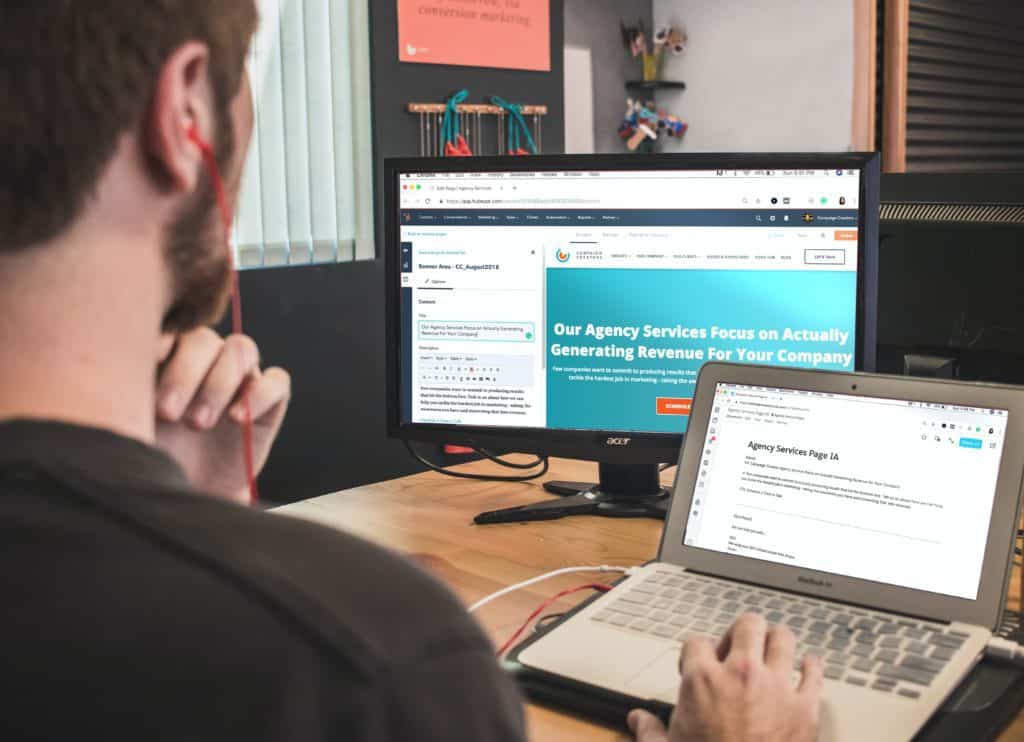
Your website is a core part of your business.
Without a website, your business doesn’t exist. It’s your virtual shop front.
It’s open 24/7.
It's a pre-suasion tool. Content on your website plants seeds of trust and gives potential clients a glimpse into your products and services.
It is a communication channel that enables prospective clients and customers to contact you directly.
That’s why having first-hand knowledge about your prospects and existing customers is so critical.
If you know what they need, you offer them products and services that will more likely result in more revenue.
If you know what doesn’t appeal to them, you remove or change your business offerings and focus your efforts on profitable activities.
If you are aware of your prospects’ concerns, you address them and convince them to hand over their hard-earned money.
Knowing what’s going on in the heads of your customers gives you an edge in winning them over!
That’s why Google Analytics should never be an afterthought for your business. It’s a priority.
Insights from Google Analytics reports is the ammunition you need to fill up your pipelines and boost your revenue!

How Google Analytics can boost your revenue numbers
Visualize this.
If you had a physical shopfront today and you want to maximize your potential earnings, you’ll want to arm yourself with the following basic knowledge:
- How many people walk past your shop every day and who they are
- Number of people who see your shop window and pause to take a peek
- Number of people who step into your shop and browse around and how long they linger
- If they browse around, which section of the shop they head to and if they picked up any item to take a closer look
- Number of people who made an enquiry and asked for assistance
These questions guide your business decisions. Whether your shop is located at a great spot, if it's pulling in the right crowd or if your shop window is merchandised well enough to get the attention of your prospective customers.
From there, we identify the items that people were most interested in purchasing and if you have enough staff to assist customers’ queries.
I could go on and on, but I believe you get the idea.
This knowledge is pivotal for you to plan your resources wisely and maximize the usage of your assets.
Similarly, on your virtual storefront, setting up Google Analytics means you’ll have easy access to information that empowers your decisions.

Making the most out of Google Analytics reports
Google Analytics gives you the capability to extract numbers to learn who your customers are, what they want and exactly how to convince them to buy (more!) from you!
The marketing platform has a standardized reporting interface for anyone to view key performance metrics for websites. There is also the option to customize specific reports that are unique to your own business.
For e-commerce business owners, you can see which check-out pages did your customers exited from and how you can optimize those pages to reduce people from making the final payment step.
For those who want to have a quick daily and weekly overview, you can create dashboards that allow you to have a bird eye view of your customers’ browsing and buying behaviour.
You can set up a notification email to be sent to yourself and your team when there is a sudden traffic spike or drop on your website.
Benefits for Paid Advertising Campaigns
And if you are running any social media or paid advertising campaigns, you’ll know instantly if those campaigns are sending any visitors to your website or if they are visitors who are more likely to buy from you.
Sometimes that one click from your paid campaign might not instantly translate into a transaction. These days, it requires multiple interactions to build up the trust for money to be handed over.
You can join the dots to determine the effectiveness of cost per customer acquisition from your Facebook or Instagram marketing campaign if your website tracking system is in place.
With Google Analytics, you’ll get immediate feedback when your campaigns are not showing significant positive results. And you could make quick changes to your plans to minimize risks and losses!
It makes no monetary sense to wait till the end of the campaign to discover your marketing activities were a total waste of time and money.

Calculating the return on investment (ROI) of your content and social media strategies.
Do you know what's the ROI for your content marketing strategy?
If you’ve been pumping time and money into creating content, you should have a clear picture of whether they are getting any Google traffic or filling up your pipeline.
Ask yourself questions.
Is your blog attracting new clients from Google?
If not, maybe you want to make sure your articles and videos are found on Google page one - learn how I helped a client get her blog posts to Google page one and got from 0 to 6000 Monthly Visits.
And if you are consistently paying someone to create and publish social media posts, do you know if those social content is even boosting your baseline revenue at all?
Do any of the folks who liked and commented on your Facebook, Instagram, Twitter, LinkedIn or Pinterest posts click to check out your website?
Are your Youtube videos generating hot leads? (If not, I highly recommend you to start with my article: How to grow a YouTube channel from 0 to 100 subscribers and how to turn them into paying customers.)
If you don't have any answers for these, why are you even spending the money in the first place? It's pointless writing those blog posts, creating the videos and conversations on social media just because everyone else is doing it.
You are running a business here. If you aren't aware of your numbers, you are simply flushing money down the toilet bowl.
Make the most out of your assets.
I always tell my clients: If you are serious about growing your revenue, Google Analytics is a must for your business!

Stop the guesswork in your business
Cease the guessing and speculations.
Fire up your business decisions in 2022.
If you want to
- maximize your investment in your marketing activities
- discover how visitors arrive on your website
- uncover what your customers are doing on your virtual storefront
- how to turn your blog traffic into warm and hot leads
- learn whether they intend to buy or if they are one step away from tapping on that buy button,
it’s time to dig deep into your Google Analytics reports and turn website visitors into customers by arming yourself with a content marketing strategy that grows your business. If you are new to content marketing, check out my other article: Content Marketing Starter Guide 2022.
If you are also keen to get your blog or YouTube channel driving leads to your website, talk to me.

LinkedIn Lead Generation in 2025: Organic vs Paid
Whether you are a small business owner or part of a big enterprise, get this: 80% of B2B leads come from LinkedIn.
Before LinkedIn came into the picture, Facebook was regarded as the number one lead generation platform.
However, since 2018, this platform has been plagued with privacy issues since the Cambridge Analytica scandal and there is a growing dissent among the users.
In March 2020, there was a massive Facebook outage that lasted for a day.
It affected Messenger, Instagram and the FB apps. Businesses weren't able to run their ads and people experienced difficulties with the platforms.
If you've been totally reliant on Facebook, the LinkedIn platform is the best alternative to diversify risk of dependence on a single platform in 2025.
If you want to successfully generate leads on LinkedIn, this article is for you.

Table of Contents
- Why LinkedIn is a key lead generation platform
- So, how do you actually generate leads from LinkedIn?
- Communication etiquette on LinkedIn and what's the best way to nurture relationships?
- Is there a real need for a LinkedIn content strategy?
- How do I know if I'm making progress on LinkedIn?
- What's next?
Why LinkedIn is a key lead generation platform
LinkedIn has undergone huge transformation since 2017 and is so much more than a resume repository.
Today, it is also a virtual professional platform where businesses generate leads and widen their business network.
Users on LinkedIn are strictly there for professional purposes (unlike on Facebook!).
And one of their objectives is to expand their network, identify prospects and eventually turn them into paying customers.
If you own a business-to-business (B2B) or work for a B2B company, it’s the place to be - for networking with other professionals and getting in touch with decision-makers to fill up your sales pipelines.
You can also refer to my other in-depth article on how to maximise your business & career opportunities on LinkedIn.
In this article, I'll be focusing solely on this network's business opportunities that host over 260 million monthly active users.
LinkedIn drives over 50% of all traffic to B2B websites and blogs.
More traffic means you'll get higher visibility and more people check out your business offerings.
This is the gateway of opportunity for potential collaboration and prospective clients!
Not only that, if you plan to partner up with huge enterprises and isn't connected with anyone in that space, keep in mind - 90 million LinkedIn users are senior-level influencers.
And 63 million have decision-making power!
Up next, I'm diving into the process of extracting lead opportunities from this social network.
So, how do you actually generate leads from LinkedIn?
Similar to all social media channels, there are the paid and the organic approach.
LinkedIn paid channels include sponsored posts, text ads and sponsored messaging.
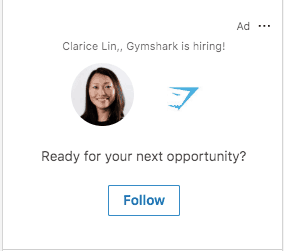
LinkedIn Text Ads
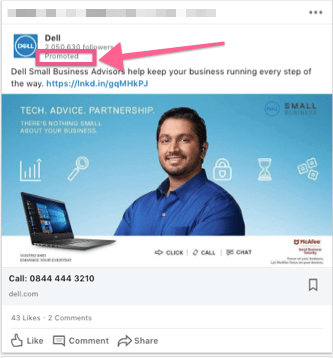
Text ads are on the right-hand side of the newsfeed and it usually looks like this.
At the top right hand corner of the ad, you'll see the word "Ad".
It's typically customized and you'll likely see the ad addressed to you personally.
LinkedIn Sponsored Posts
Sponsored posts are similar to boosted posts on Facebook pages.
Essentially you create a post and pay money to get the attention of a specific group of people you are not connected to.
If you are connected to them, LinkedIn will make sure your boosted post show up in the newsfeed.
You can spot them when you see the word "Promoted" in the post.
Be prepared to fork out at least $2 per click and be as descriptive and specific as possible when defining your target audience group.
For a sponsored post, you have the options of either using a single image (known as the Single Image Ad), multiple images (Carousel Ad), or a video (Video Ad).
Sponsored Messaging
The last method is using Sponsored Messaging.
If you aren't connected to a person, you can't send them private messages.
Or if the person is beyond your third level connections (no mutual connections at all), you can't correspond with them.
The format could either be similar to sending a direct message or initiating quality conversations with your audience through a choose-your-own-path experience.
Sponsored Message Ad
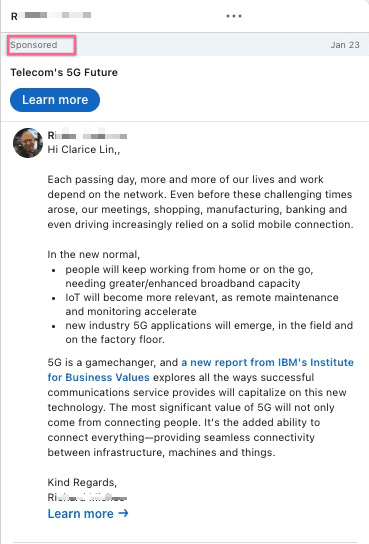
A sponsored message looks almost identical to a normal inMail.
But you can identify it by the word "Sponsored" at the top of the message.
You write your message and include links to relevant resources.
A sponsored messaging campaign runs like an auction.
You compete against other advertisers who want to send messages to the same group of people as you.
Basically, you bid for the maximum amount you are willing to pay for each sent message.
If your bid is lower than your competitors, then they will win the bid and their messages will be sent to the targeted individuals (instead of yours).
If you win the bid, you'll only pay as much as the second-highest bidder.
You'll only pay when your bid is successful and your sponsored message appears in your target audience's LinkedIn inbox.
When you reach the bid and budget page of your campaign setup, there will be a suggested bid for reaching your target audience.
Sponsored Conversational Ad
The conversational ad also pops up in the LinkedIn inbox. Similar to the Message ad, the word "Sponsored" will appear on the top of the message. The only difference is, the responses for my action are displayed as buttons.
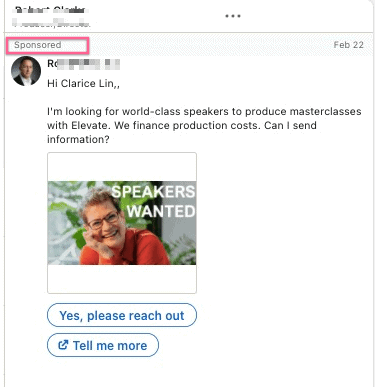
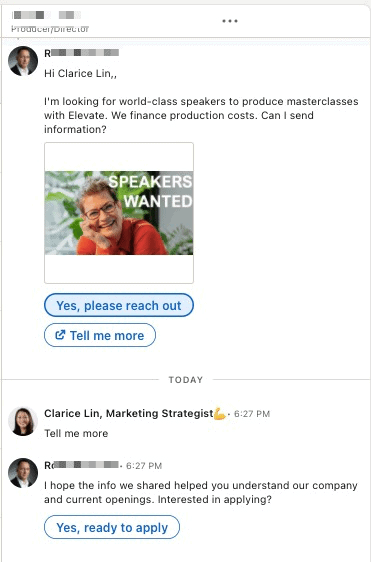
In this particular instance, when I click on "Tell me more", a new tab will open up with more information and an automated follow-up reply will appear. See the below screenshot.
While if I click on "Yes, please reach out" or "Yes, ready to apply", an application in the form of a dialogue box will appear.
If you are not ready to fork out the money for the paid approach yet, there is still the content marketing option for you.
Grow your audience by publishing content on your personal profile and company page.
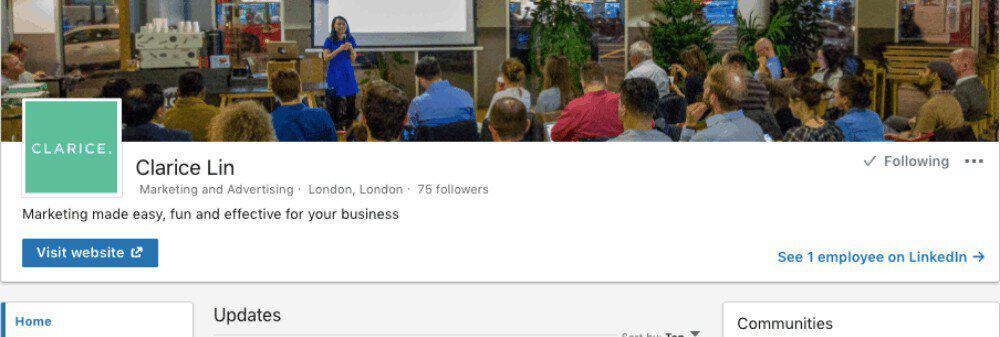
Prior to publishing content on a regular basis, don't forget to polish up both your personal profile and company page by including the right keywords and of course selecting the right LinkedIn profile photo to make the best first impression.
What are the best types of content that work very well on LinkedIn?
There are different content types that trigger huge amounts of engagements.
Content that create ah-ha moments or reveal something shocking they didn’t know about usually go down well with the LinkedIn audience.
Some of the most popular themes and topic include:
- How-to posts - these could be tech tips, marketing tips, video tips or even writing tactics etc. Example: 5 ways you can increase watch time on Youtube.
- Stories of specific incidents that happened at work or at home and the take-aways. In particular, stories revolving around underdogs tend to go viral very quickly.
- Job hunting stories - how someone who was laid off found a job after 9 months. Lesson learned: don't give up, persistence pays off eventually.
- Recruitment stories - how a company was rewarded when they took in a candidate who was late for an interview. Lesson learned: never judge a book by its cover 🙂
- Controversial posts - things to do or not to do on LinkedIn. Example: LinkedIn is not Facebook.
- Asking for help posts also work well. People on LinkedIn are helpful so they tend to want to help where possible. I’ve written a comprehensive article detailing how two of my asking-for-help text posts went viral on LinkedIn
Now you've got an idea of which content goes down well on LinkedIn, let's dive into the topic of relevance.
How can businesses learn to create relevant content on LinkedIn?
It's all very well to create viral posts.
However, at the end of the day, did the viral post help you to achieve your professional objectives?
Are the "right" people connecting to you? Are you getting any leads from the viral content?
If the answer is no, then perhaps you need to review the LinkedIn content you are putting out on the professional platform.
The objectives of creating content LinkedIn are create opportunities, conversations & make yourself visible while establishing your authority.
Focus on who you want to attract and what they are most interested in.

Relevance is the name of the game.
When your content is relevant, these opportunities will come knocking at your door
- The "right" people want to connect with you.
- The "right" people recommend potential clients to you.
- The "right" people support your business and want to collaborate with you.
The key rule of thumb is create easy to understand content, easy to respond and EXPERIMENT.
The more you create, the better you get. You can begin by using these as your yardstick.
- What type of content get more eyeballs?
- Which content resulted in more connection requests
- Which content resulted in more shares and interaction?
When planning your content, keep these in mind:
- Does this content show my expertise?
- Are you explaining too many things in limited characters?
- Create ah-ha moments for your audience?
- What’s the takeaway?
- What’s the call to action from your content?
- Are you targeting a broad spectrum or is it only meant for certain groups of people?
Communication etiquette on LinkedIn and what's the best way to nurture relationships?
Put on your best behaviour. The rule of the thumb - never send a message or write a comment that you would never say to someone in the face.
If you don't know a person and you disagree with their opinion, don't be rude.
State your stand in a polite manner and if you can't come to an agreement, there is always the option to agree to disagree.
If you see a post that is absolutely ridiculous and doesn't make sense, scroll down and ignore those content.
Your purpose on LinkedIn is to generate leads, not to pick a fight.

Business communication on LinkedIn
There are mainly two ways for you to communicate on LinkedIn - either through your company page where you post updates or on your personal profile.
Using your personal profile to lead online conversations is the recommended method to create trust.
People love to know who they are talking to - unless you are a well-known household name, using your personal profile to grow your LinkedIn page is more effective than hiding behind your company name.
Initiating professional relationships
Initiating conversation is easy. Creating the rapport to further the conversation can be challenging. Creating your own content on LinkedIn is akin to the fire starter for a charcoal fire.
Let's say, you want to connect with HR professionals. Publishing content about the latest HR technology, the hottest HR challenge or a solution to improve the HR process would appeal to the HR audience.
In this case, the content piece becomes the conversation starter with HR professionals.
Rapport is built when there is a common understanding or when someone feels you are providing assistance.
Communication wise, tap into public channels like using your LinkedIn company page, your personal profile to publish and share high quality content and your opinion.
Nurturing : replying to comments on your own content, commenting on other people’s content and through private messaging to have more in-depth next level relationships
In terms of nurturing, after private messaging, you can initiate a (video) call or even meet face to face! I’ve nurtured many relationships through LinkedIn and have met many people in real life - when they come to London!
Here’s a video I created about “The best way to increase your LinkedIn connections”:
How can businesses make sure conversations doesn’t stop after the content is published?
Posting content on LinkedIn has become insufficient. Building relationships is a two way traffic.
When there is no interaction with your audience, the gap between you and them continues to exist.
To narrow the gap, these are the actions I recommend
- Connect with new people who’ve liked your content or left a comment.
- Ask them follow-up questions after they leave a comment
- Drop them a private message to further the conversation
- Make notes about what they are most interested in so you can tag them in your future related posts about the particular topic.
If you want to be serious about keeping up your relationships, note down the dates where you last spoke to them and set a regular interval to check in and catch up.
Here’s also a super lengthy post I wrote on how you can grow your LinkedIn network.

Is there a real need for a LinkedIn content strategy?
Absolutely.
A LinkedIn content strategy is the roadmap to unearth quality prospects that aligns with our ideal audience personas. This roadmap documents content topic ideas that align to the problems of the prospects.
A good content strategy shapes the rhythm of the publishing calendar and identifies resources needed to execute the plan.
Ideally, each identified topic or sub-topic should
1. Attract the ideal prospect with additional information or other frequently asked questions around this specific sub-topic.
2. Demonstrate your knowledge and authority in this subject matter by linking to valid sources.
3. Nurture the relationships from cold to warm or warm to hot and of course, push them to take the final step of buying you from you.
The non-negotiable call to action in each piece of LinkedIn content
Accompanying each piece of content is a non-negotiable call to action for the reader to take.
It could be an ask for an opinion, checking out a resource on your website, tagging one of their connections etc.
Each of these actions translates into an interaction opportunity.
In marketing terms, this is also called a micro-commitment.
And the purpose of every micro-commitment is to create trust.
And through the trust-building process, inspire a potentially strong relationship that will mature into a buy decision. from you.

Picture post update vs. link post update vs. video post update vs document post update
What are the advantages of alternating content types?
The LinkedIn algorithm is changing all the time.
(That's one of the drawbacks of purely relying on an external platform and not having your own email list. It's a topic for another day.)
In 2017, text update posts were favoured
Beginning of 2018, the algorithm prioritized video posts (to boost adoption) after LinkedIn upgraded their entire infrastructure to support videos.
Towards the end of 2018, document post updates (i.e. Word doc, PDF etc) were marked as a higher priority on the newsfeed.
LinkedIn live videos were a hit in the initial launch in 2019.
There are still people follow live streaming on LinkedIn especially for professionals who might have more time to spend online networking. Still, be prepared: if your network is not ready for live streaming, it's highly like people will start disconnecting from you.
Each time you go live, your connections and followers will receive a notification that you are live.
To do a LinkedIn Live video broad, you need to have more than 150 connections and/or followers, have abided by LinkedIn's Professional Community Policies and your account must have been created at least 30 days ago.
It might seem counterintuitive to alternate your content types.
Nonetheless, I still recommend to alternate your content types because some people have more time & prefer videos while a time-strapped professional prefers to read text.
But if you’ve limited time, focus on videos & text posts.
If you have more time on hand, add in pictures and create documents to share.
And from time to time, publish a long form article. Short form article works well as bite-sized content but a long article showcases your thought process in more details.
Moreover, most people do have a preferred way of learning, either listening to audio, watching videos or reading.
So when you focus to publish only in a single format, some groups of people will be left out!
I’ve also recorded a video about this topic and wrote a long article about the best LinkedIn content types.
Long form content on LinkedIn
There is also the option of creating longer form content on LinkedIn Pulse by combining your post updates into a more descriptive article beyond 1,300 characters.
Long form content offers the opportunity to combine your expertise into an authority piece and it's easier for others to find this article from your LinkedIn profile.
In comparison, if you publish a post update everyday, it's extremely difficult for someone to find a piece that you've put out two weeks ago. It takes a long time to load historical post updates unlike articles on LinkedIn Pulse.
In 2020, you can also become a newsletter author on LinkedIn and members can subscribe to your newsletter to receive updates when you publish something new. A newsletter is a set of regularly published articles on LinkedIn, typically about a specific topic.
Through a newsletter, you showcase your domain knowledge consistently such that subscribers would be excited to receive your next article.
You can leverage this feature to grow your email list by channelling readers to your website with more intriguing content after consuming your compelling weekly (or monthly) content.
Best part is, once you have set up your newsletters, it is discoverable through LinkedIn search and this feature is also discoverable on Google search. Make sure you optimize your title and meta description to enable Google search users to discover your content.
How do I know if I'm making progress on LinkedIn?
Setting your LinkedIn Objectives
Firstly, set your LinkedIn objectives - what do you want to achieve on this B2B platform?
- Do you want to grow your network to nurture prospective clients' relationships?
- Are you exploring alternative partnership opportunities?
- Is growing your company LinkedIn page your top priority?
Write them down and be clear with your priorities.
Once your goals have been clearly defined, the next step is to outline the route to achieve them.
Identifying the ideal people you want in your LinkedIn network
Let's say, you want to grow a prospective ideal network that will get you referrals over time. First, identify the key attributes.
- What is their job title or job role?
- What is their industry or sector?
- Which country or city do they live in?
- Which companies have they worked for?
- A specific company's employees etc
- Company size of the individual
Once you've narrowed down your list of ideal people you want to connect with, this is the list which you will be using to grow your network.

How can a business measure their LinkedIn progress?
By setting quantifiable goals.
What do you want to achieve by the end of 12 months?
Then begin working backwards.
Set up a spreadsheet and against those objectives, set tangible metrics like
- Number of daily connection requests you receive
- Number of connection requests you sent and was accepted
- Number of people you PM-ed/have a call/meet-up,
- Number of likes/views/comments/shares for each piece of content you published
- Number of profile views how many profile views you had,
- Number of people who visited your website etc
It’s a rigorous process but if you are spending a lot of time on LinkedIn and really want to make sure your efforts see results, tracking becomes important.
If you can’t measure it properly and see your progress, then spending time on LinkedIn would naturally become less of a priority.
Here’s another article on how to use tangible metrics to measure and extend your success on LinkedIn.
What's next?
Now you have a complete picture of the lead generation options on LinkedIn, it's time for you to grab hold of this opportunity to diversify your lead sources.
I recommend you to check out two of my other articles: The New LinkedIn: How to Amplify Your Career and Business Opportunities and Most Underrated Strategy To Grow Your LinkedIn Network to level up your LinkedIn strategy that generates high-quality leads for your business.
If you require more personal guidance on either the paid or organic approach to minimize your spending and maximize your results, let's talk.

Content Marketing Starter Guide For Beginners
A successful content marketing strategy results in production of high-quality that ultimately fills up your sales pipeline. Here's how you do it.
Latest articles


