facial-expression-furnitures-indoors-1595387

LinkedIn Lead Generation in 2025: Organic vs Paid

Whether you are a small business owner or part of a big enterprise, get this: 80% of B2B leads come from LinkedIn.

Before LinkedIn came into the picture, Facebook was regarded as the number one lead generation platform.

However, since 2018, this platform has been plagued with privacy issues since the Cambridge Analytica scandal and there is a growing dissent among the users.

In March 2020, there was a massive Facebook outage that lasted for a day.

It affected Messenger, Instagram and the FB apps. Businesses weren't able to run their ads and people experienced difficulties with the platforms.

If you've been totally reliant on Facebook, the LinkedIn platform is the best alternative to diversify risk of dependence on a single platform in 2025.

If you want to successfully generate leads on LinkedIn, this article is for you.
LinkedIn lead generation

Table of Contents

Why LinkedIn is a key lead generation platform

LinkedIn has undergone huge transformation since 2017 and is so much more than a resume repository.

Today, it is also a virtual professional platform where businesses generate leads and widen their business network.

Users on LinkedIn are strictly there for professional purposes (unlike on Facebook!).

And one of their objectives is to expand their network, identify prospects and eventually turn them into paying customers.

If you own a business-to-business (B2B) or work for a B2B company, it’s the place to be - for networking with other professionals and getting in touch with decision-makers to fill up your sales pipelines.

You can also refer to my other in-depth article on how to maximise your business & career opportunities on LinkedIn.

In this article, I'll be focusing solely on this network's business opportunities that host over 260 million monthly active users.

LinkedIn drives over 50% of all traffic to B2B websites and blogs.

More traffic means you'll get higher visibility and more people check out your business offerings.

This is the gateway of opportunity for potential collaboration and prospective clients!

Not only that, if you plan to partner up with huge enterprises and isn't connected with anyone in that space, keep in mind - 90 million LinkedIn users are senior-level influencers.

And 63 million have decision-making power!

Up next, I'm diving into the process of extracting lead opportunities from this social network.

So, how do you actually generate leads from LinkedIn?

Similar to all social media channels, there are the paid and the organic approach.

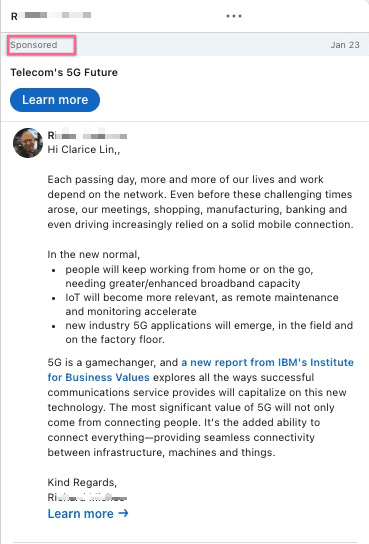
LinkedIn paid channels include sponsored posts, text ads and sponsored messaging.
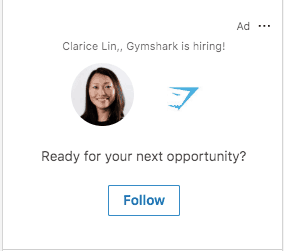
LinkedIn Text Ad
LinkedIn Text Ad

LinkedIn Text Ads

Text ads are on the right-hand side of the newsfeed and it usually looks like this.

At the top right hand corner of the ad, you'll see the word "Ad".

It's typically customized and you'll likely see the ad addressed to you personally.
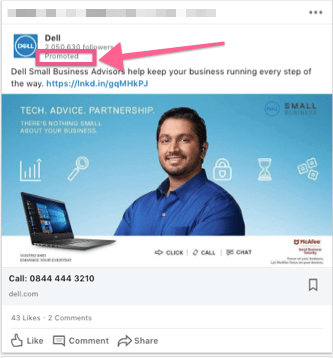
LinkedIn sponsored posts

LinkedIn Sponsored Posts

Sponsored posts are similar to boosted posts on Facebook pages.

Essentially you create a post and pay money to get the attention of a specific group of people you are not connected to.

If you are connected to them, LinkedIn will make sure your boosted post show up in the newsfeed.

You can spot them when you see the word "Promoted" in the post.

Be prepared to fork out at least $2 per click and be as descriptive and specific as possible when defining your target audience group.

For a sponsored post, you have the options of either using a single image (known as the Single Image Ad), multiple images (Carousel Ad), or a video (Video Ad).

The last method is using Sponsored Messaging.

If you aren't connected to a person, you can't send them private messages.

Or if the person is beyond your third level connections (no mutual connections at all), you can't correspond with them.

The format could either be similar to sending a direct message or initiating quality conversations with your audience through a choose-your-own-path experience.

Sponsored Direct Message

A sponsored message looks almost identical to a normal inMail.

But you can identify it by the word "Sponsored" at the top of the message.

You write your message and include links to relevant resources.

A sponsored messaging campaign runs like an auction.

You compete against other advertisers who want to send messages to the same group of people as you.

Basically, you bid for the maximum amount you are willing to pay for each sent message.

If your bid is lower than your competitors, then they will win the bid and their messages will be sent to the targeted individuals (instead of yours).

If you win the bid, you'll only pay as much as the second-highest bidder.

You'll only pay when your bid is successful and your sponsored message appears in your target audience's LinkedIn inbox.

When you reach the bid and budget page of your campaign setup, there will be a suggested bid for reaching your target audience.

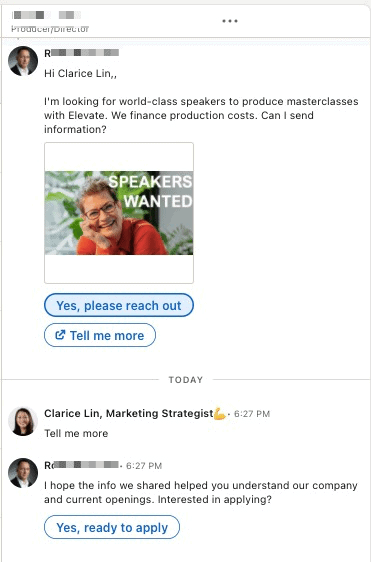
The conversational ad also pops up in the LinkedIn inbox. Similar to the Message ad, the word "Sponsored" will appear on the top of the message. The only difference is, the responses for my action are displayed as buttons.
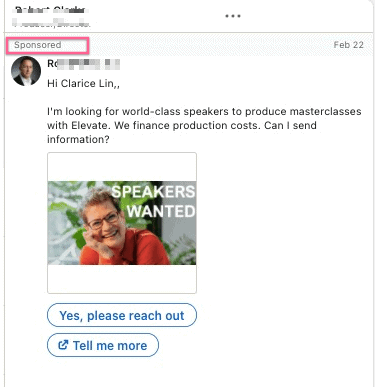


In this particular instance, when I click on "Tell me more", a new tab will open up with more information and an automated follow-up reply will appear. See the below screenshot.

While if I click on "Yes, please reach out" or "Yes, ready to apply", an application in the form of a dialogue box will appear.
If you are not ready to fork out the money for the paid approach yet, there is still the content marketing option for you.

Grow your audience by publishing content on your personal profile and company page.

Prior to publishing content on a regular basis, don't forget to polish up both your personal profile and company page by including the right keywords and of course selecting the right LinkedIn profile photo to make the best first impression.
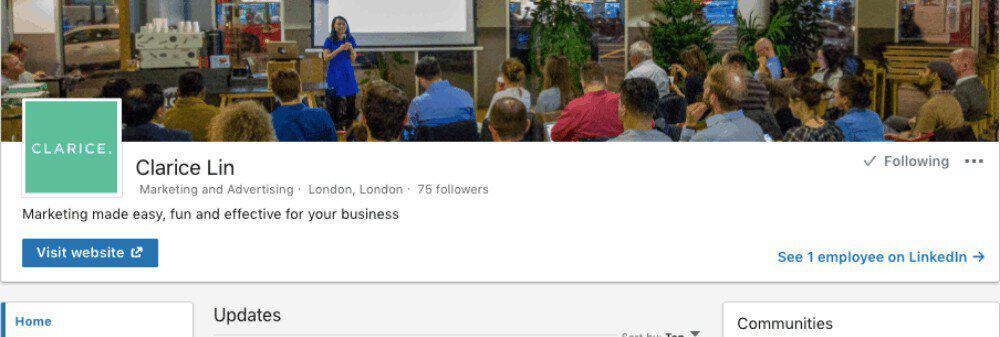
Grow your LinkedIn page

What are the best types of content that work very well on LinkedIn?

There are different content types that trigger huge amounts of engagements.

Content that create ah-ha moments or reveal something shocking they didn’t know about usually go down well with the LinkedIn audience.

Some of the most popular themes and topic include:

  • How-to posts - these could be tech tips, marketing tips, video tips or even writing tactics etc. Example: 5 ways you can increase watch time on Youtube.
  • Stories of specific incidents that happened at work or at home and the take-aways. In particular, stories revolving around underdogs tend to go viral very quickly.
    • Job hunting stories - how someone who was laid off found a job after 9 months. Lesson learned: don't give up, persistence pays off eventually.
    • Recruitment stories - how a company was rewarded when they took in a candidate who was late for an interview. Lesson learned: never judge a book by its cover 🙂
  • Controversial posts - things to do or not to do on LinkedIn. Example: LinkedIn is not Facebook.
  • Asking for help posts also work well. People on LinkedIn are helpful so they tend to want to help where possible. I’ve written a comprehensive article detailing how two of my asking-for-help text posts went viral on LinkedIn

Now you've got an idea of which content goes down well on LinkedIn, let's dive into the topic of relevance.

How can businesses learn to create relevant content on LinkedIn?

It's all very well to create viral posts.

However, at the end of the day, did the viral post help you to achieve your professional objectives?

Are the "right" people connecting to you? Are you getting any leads from the viral content?

If the answer is no, then perhaps you need to review the LinkedIn content you are putting out on the professional platform.

The objectives of creating content LinkedIn are create opportunities, conversations & make yourself visible while establishing your authority.

Focus on who you want to attract and what they are most interested in.

every company is a media business

Relevance is the name of the game.

When your content is relevant, these opportunities will come knocking at your door

  • The "right" people want to connect with you.
  • The "right" people recommend potential clients to you.
  • The "right" people support your business and want to collaborate with you.

The key rule of thumb is create easy to understand content, easy to respond and EXPERIMENT.

The more you create, the better you get. You can begin by using these as your yardstick.

  1. What type of content get more eyeballs?
  2. Which content resulted in more connection requests
  3. Which content resulted in more shares and interaction?

When planning your content, keep these in mind:

  1. Does this content show my expertise?
  2. Are you explaining too many things in limited characters?
  3. Create ah-ha moments for your audience?
  4. What’s the takeaway?
  5. What’s the call to action from your content?
  6. Are you targeting a broad spectrum or is it only meant for certain groups of people?

Communication etiquette on LinkedIn and what's the best way to nurture relationships?

Put on your best behaviour. The rule of the thumb - never send a message or write a comment that you would never say to someone in the face.

If you don't know a person and you disagree with their opinion, don't be rude.

State your stand in a polite manner and if you can't come to an agreement, there is always the option to agree to disagree.

If you see a post that is absolutely ridiculous and doesn't make sense, scroll down and ignore those content.

Your purpose on LinkedIn is to generate leads, not to pick a fight.

building relationships

Business communication on LinkedIn

There are mainly two ways for you to communicate on LinkedIn - either through your company page where you post updates or on your personal profile.

Using your personal profile to lead online conversations is the recommended method to create trust.

People love to know who they are talking to - unless you are a well-known household name, using your personal profile to grow your LinkedIn page is more effective than hiding behind your company name.

Initiating professional relationships

Initiating conversation is easy. Creating the rapport to further the conversation can be challenging. Creating your own content on LinkedIn is akin to the fire starter for a charcoal fire.

Let's say, you want to connect with HR professionals. Publishing content about the latest HR technology, the hottest HR challenge or a solution to improve the HR process would appeal to the HR audience.

In this case, the content piece becomes the conversation starter with HR professionals.

Rapport is built when there is a common understanding or when someone feels you are providing assistance.

Communication wise, tap into public channels like using your LinkedIn company page, your personal profile to publish and share high quality content and your opinion.

Nurturing : replying to comments on your own content, commenting on other people’s content and through private messaging to have more in-depth next level relationships

In terms of nurturing, after private messaging, you can initiate a (video) call or even meet face to face! I’ve nurtured many relationships through LinkedIn and have met many people in real life - when they come to London!

Here’s a video I created about “The best way to increase your LinkedIn connections”:

How can businesses make sure conversations doesn’t stop after the content is published?

Posting content on LinkedIn has become insufficient. Building relationships is a two way traffic.

When there is no interaction with your audience, the gap between you and them continues to exist.

To narrow the gap, these are the actions I recommend

  1. Connect with new people who’ve liked your content or left a comment.
  2. Ask them follow-up questions after they leave a comment
  3. Drop them a private message to further the conversation
  4. Make notes about what they are most interested in so you can tag them in your future related posts about the particular topic.

If you want to be serious about keeping up your relationships, note down the dates where you last spoke to them and set a regular interval to check in and catch up.

Here’s also a super lengthy post I wrote on how you can grow your LinkedIn network.

Problem solver

Is there a real need for a LinkedIn content strategy?

Absolutely.

A LinkedIn content strategy is the roadmap to unearth quality prospects that aligns with our ideal audience personas. This roadmap documents content topic ideas that align to the problems of the prospects.

A good content strategy shapes the rhythm of the publishing calendar and identifies resources needed to execute the plan.

Ideally, each identified topic or sub-topic should

1. Attract the ideal prospect with additional information or other frequently asked questions around this specific sub-topic.

2. Demonstrate your knowledge and authority in this subject matter by linking to valid sources.

3. Nurture the relationships from cold to warm or warm to hot and of course, push them to take the final step of buying you from you.

The non-negotiable call to action in each piece of LinkedIn content

Accompanying each piece of content is a non-negotiable call to action for the reader to take.

It could be an ask for an opinion, checking out a resource on your website, tagging one of their connections etc.

Each of these actions translates into an interaction opportunity.

In marketing terms, this is also called a micro-commitment.

And the purpose of every micro-commitment is to create trust.

And through the trust-building process, inspire a potentially strong relationship that will mature into a buy decision. from you.

LinkedIn Post Vanity Metrics

Picture post update vs. link post update vs. video post update vs document post update

What are the advantages of alternating content types?

The LinkedIn algorithm is changing all the time.

(That's one of the drawbacks of purely relying on an external platform and not having your own email list. It's a topic for another day.)

In 2017, text update posts were favoured

Beginning of 2018, the algorithm prioritized video posts (to boost adoption) after LinkedIn upgraded their entire infrastructure to support videos.

Towards the end of 2018, document post updates (i.e. Word doc, PDF etc) were marked as a higher priority on the newsfeed.

LinkedIn live videos were a hit in the initial launch in 2019.

There are still people follow live streaming on LinkedIn especially for professionals who might have more time to spend online networking. Still, be prepared: if your network is not ready for live streaming, it's highly like people will start disconnecting from you.

Each time you go live, your connections and followers will receive a notification that you are live.

To do a LinkedIn Live video broad, you need to have more than 150 connections and/or followers, have abided by LinkedIn's Professional Community Policies and your account must have been created at least 30 days ago.

It might seem counterintuitive to alternate your content types.

Nonetheless, I still recommend to alternate your content types because some people have more time & prefer videos while a time-strapped professional prefers to read text.

But if you’ve limited time, focus on videos & text posts.

If you have more time on hand, add in pictures and create documents to share.

And from time to time, publish a long form article. Short form article works well as bite-sized content but a long article showcases your thought process in more details.

Moreover, most people do have a preferred way of learning, either listening to audio, watching videos or reading.

So when you focus to publish only in a single format, some groups of people will be left out!

I’ve also recorded a video about this topic and wrote a long article about the best LinkedIn content types.

Long form content on LinkedIn

There is also the option of creating longer form content on LinkedIn Pulse by combining your post updates into a more descriptive article beyond 1,300 characters.

Long form content offers the opportunity to combine your expertise into an authority piece and it's easier for others to find this article from your LinkedIn profile.

In comparison, if you publish a post update everyday, it's extremely difficult for someone to find a piece that you've put out two weeks ago. It takes a long time to load historical post updates unlike articles on LinkedIn Pulse.

In 2020, you can also become a newsletter author on LinkedIn and members can subscribe to your newsletter to receive updates when you publish something new. A newsletter is a set of regularly published articles on LinkedIn, typically about a specific topic.

Through a newsletter, you showcase your domain knowledge consistently such that subscribers would be excited to receive your next article.

You can leverage this feature to grow your email list by channelling readers to your website with more intriguing content after consuming your compelling weekly (or monthly) content.

Best part is, once you have set up your newsletters, it is discoverable through LinkedIn search and this feature is also discoverable on Google search. Make sure you optimize your title and meta description to enable Google search users to discover your content.

How do I know if I'm making progress on LinkedIn?

Setting your LinkedIn Objectives

Firstly, set your LinkedIn objectives - what do you want to achieve on this B2B platform?

  • Do you want to grow your network to nurture prospective clients' relationships?
  • Are you exploring alternative partnership opportunities?
  • Is growing your company LinkedIn page your top priority?

Write them down and be clear with your priorities.

Once your goals have been clearly defined, the next step is to outline the route to achieve them.

Identifying the ideal people you want in your LinkedIn network

Let's say, you want to grow a prospective ideal network that will get you referrals over time. First, identify the key attributes.

  • What is their job title or job role?
  • What is their industry or sector?
  • Which country or city do they live in?
  • Which companies have they worked for?
  • A specific company's employees etc
  • Company size of the individual

Once you've narrowed down your list of ideal people you want to connect with, this is the list which you will be using to grow your network.

fear is not real

How can a business measure their LinkedIn progress?

By setting quantifiable goals.

What do you want to achieve by the end of 12 months?

Then begin working backwards.

Set up a spreadsheet and against those objectives, set tangible metrics like

  • Number of daily connection requests you receive
  • Number of connection requests you sent and was accepted
  • Number of people you PM-ed/have a call/meet-up,
  • Number of likes/views/comments/shares for each piece of content you published
  • Number of profile views how many profile views you had,
  • Number of people who visited your website etc

It’s a rigorous process but if you are spending a lot of time on LinkedIn and really want to make sure your efforts see results, tracking becomes important.

If you can’t measure it properly and see your progress, then spending time on LinkedIn would naturally become less of a priority.

Here’s another article on how to use tangible metrics to measure and extend your success on LinkedIn.

What's next?

Now you have a complete picture of the lead generation options on LinkedIn, it's time for you to grab hold of this opportunity to diversify your lead sources.

I recommend you to check out two of my other articles: The New LinkedIn: How to Amplify Your Career and Business Opportunities and Most Underrated Strategy To Grow Your LinkedIn Network to level up your LinkedIn strategy that generates high-quality leads for your business.

If you require more personal guidance on either the paid or organic approach to minimize your spending and maximize your results, let's talk.


architecture-cityscape-cityview-34166

What's the best content type to post on LinkedIn

Content is the foundation of any B2B business

In this age of digital, everyone is hungry for more information. They look for information to enrich themselves, they research on products and services to ensure they are getting the "best buy".

And they want to know everything possible about the products before tapping on the purchase button.

And that's where content comes into play. Every business on LinkedIn should provide relevant advice, knowledge to their potential customers. Because they want to know MORE before making the final decision.

They want to make sound decisions whether it's through the media or directly on the website or from peer buyers.

The savvy consumers wants to make the most confident choice possible.

Everything possible that could swing from a "yes" to "no.

Why every business should learn to create content on LinkedIn.

Because YOU WANT

  • more people to know about your business
  • to convince your prospects to buy from you
  • existing customers to keeping returning to buy from you
  • to keep your business at the top of their minds.

And content is just the communication tool to initiate conversations and nurture relationships.

LinkedIn is more than a job seeker's platform

Summer 2017 was LinkedIn's tipping point. The early adopters jumped into the LinkedIn bandwagon and flooded the newsfeed with content. There were text post updates, Pulse articles, link sharing, native videos and pictures.

There were discussions about what was appropriate on LinkedIn, what LinkedIn features users wanted next, even Jeff Weiner, LinkedIn CEO became active on the platform.

LinkedIn was buzzing with activities and communication (almost like Facebook!).

Published content on LinkedIn became the ignitor to begin conversations with strangers on LinkedIn. People we wouldn't normally connect with.

Content is the means to an end

Content is the means to an end

How communication nurture relationships

It's just like friendships or relationships with your family or partner. You need to spend time with them, listen to them, talk to them and understand them better.

If you recall, the last catch-up coffee you had with your friend last weekend - catching up - it simply means you care.

Through each interaction, (hopefully) the bond is strengthened with these sharing of life experiences, challenges and achievements. And not forgetting, the more you know about the other person, the more you trust (or not 😉 ).

Each unit of trust and interaction forms the building blocks of relationship.

And that's what the consumer today is most excited about. They want to have a proper relationships with the products and services they buy. It's not merely a monetary transaction.

By using content as a communication tool, businesses get to know what their customers are most concerned about, what are their priorities, what they are most interested in and subsequently create events, products, services, giveaways to engage and bond. And resonate.

Broadcasting your content is insufficient!

Most people who started out might have this assumption that it's enough to post content on LinkedIn and go away. And somehow magically, the relationships will be formed. I can assure you, there is no magic.

If you check out the big guns like Marie Forleo and Gary Vaynerchuk, they both have teams to ensure the conversation doesn't stop after their content is published! Vaynerchunk has TeamGaryVee to ensure every question is picked up while Marie has Team Forleo answering to each comment on her blog and video posts.

You don't want the dialogue to be one-sided. You want an exchange of thoughts. You want your audience to know, you are listening to them.

If you want to know more about initiating dialogues and furthering a conversation, check out my LinkedIn commenting strategies on how best to engage and nurture relationships.

Five types of content on LinkedIn

Text post update/Pulse articles

This is the most basic format and leaves alot of imagination space to your readers. The words and phrases you use might mean one thing to you but visualized different by your readers based on their knowledge and experience.

Pros: It's easy for anyone to quickly scan through the text and read it. Especially for people who are tight with time.

Cons: The same sentences voiced aloud compared to just pure text could have an entirely different meaning dependent on the tone of voice and cultural beliefs. This could easily result in misunderstandings.

Picture post update

A picture is equivalent to a thousand words. Whether it's a picture of you grinning away, or your favourite drawing or a quote by someone you look up to, it gives a glimpse into your personality.

It reflects a small piece of you - what you stand for, what inspires you and what drives you every single day.

Pros: If you add in some descriptive text to accompany your words, this enhances the effect of your message and help others to understand from multiple perspectives.

Cons: If you only share a picture without any words, the interpretation of the message is left up to the reader. In this way, there is lower likelihood of the exchange of ideas because there is limited thought exchange.

Picture speaks a thousand words

Link post update

You could be sharing a link to someone's article. Regardless whether you are spreading the word around or a link to an share-worthy article, it showcases your interest and opinion.

Pros: This is a great opportunity to voice your thoughts about a particular topic, trend or an issue. Whether you support it, or disagree or you have an alternative viewpoint, it allows you to portray how you think and your values as an individual and professional.

Cons: Many people tend to just share the link to a post update on LinkedIn or an external article WITHOUT explaining why it resonated with them in the first place. It defeats the purpose of creating a communication channel because your readers don't quite know how to respond to what you are sharing.

Video post update

This format is much better than pure text or picture or link sharing update. It gives a tertiary dimension to the interpretation of a sentence or question. The tone, speed, pitch of the voice enhances the speech delivery and offers a stronger delivery to the audience.

And the video showing your expression solidifies the strength of your message. Your laughter, the twinkling of your eyes, twitch of your lips and even the gesturing of your hands and body speaks volumes - these non-verbal signals speak for themselves.

As far as possible, include accompanying text above the video and corresponding subtitles so people who can't load or play the video won't be left out.

Pros: This form of content sharing is the closest to meeting someone face to face. It is a fantastic opportunity to demonstrate your energy level and your personality. It’s also more intimate & shows the authentic you!

Cons: There tends to be a inclination of sharing videos from external sources similar to what people does on Youtube. Unless it's a video reflecting your brand or a video of you or your team, it downplays the impact of connecting to your audience in comparison to sharing original content created by yourself or business.

Video content

Document post update

This is the latest content type rolled out by LinkedIn late 2018. It allows you to share your expertise via a document that can help you generate new opportunities for your brand or business.

The document you want to upload in a post update can be in PDF, Word document, or PowerPoint format. I highly recommend you to add your business logo on each page to make sure it can't be easily copyrighted and keep your brand name visible.

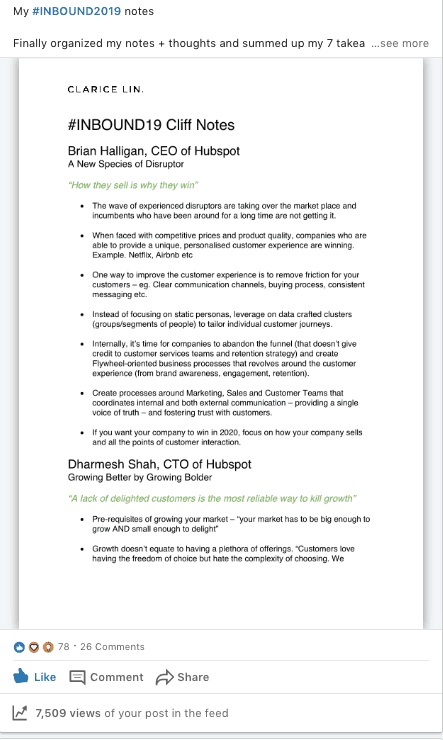
Check out my document post where I shared my #INBOUND19 event cliff notes in a 6 page PDF file and recorded over 7,000 views from 78 likes, 26 comments and 4 shares.

Clarice-Lin-LinkedIn-Document-Post Update

Pros: If you aren't ready to leap into video creation, documents is another way for you to showcase your knowledge and provide value. It doesn't have to be a 50-pager piece of work. It can simply be a one pager checklist or a repurposed blog post.

The key here is usefulness to your potential customer. Also, it's more likely to be shared by folks on LinkedIn.

Cons: You can't just post a document by itself, writing a good accompanying text to get the right people's attention is crucial. It requires a little more work compared to just writing some text.

And the layout and presentation (especially the cover) has to be attractive enough to catch the eye.

Live Video Post update

LinkedIn offers live video streaming options for the community. However, right now not everyone has the capability enabled. You have to apply to become a live video broadcaster and then wait to be notified.

To livestream on LinkedIn, you have to sign up to third-party tools and connect it to your LinkedIn account.

Right now, these are the available tools you can choose from: Socialive, Restream (that allows you to stream to Periscope, Youtube and even Facebook at the same time!), Wirecast, Switcher Studio, Wowza Cloud, StreamYard, Brandlive, Easy Live, Live U and Terdek.

Pros: Live video is a great way to interact with your audience in real time and get your audience to know the real you in more than 10 minutes (limit of the video post). You can answer your audience's questions on the spot and allows you to showcase your domain expertise.

After your live stream has ended, the video will be saved like a normal video post in the feed.

Cons: Not everyone has time to hang out on LinkedIn to watch your live video (Keep in mind - this is after-all a professional platform.) You've to make sure you notify people in advance when you are going live, so they can log in at the right time. Note: you might also get people unfollowing your going live notifications keep popping up in the feed.

Advantages of alternating your content type

There are groups of people who prefer creating a certain type of content types. For copywriters or authors, publishing text only post does help to boost your authority as a creative writer and the flow of your ideas through words.

And indeed, most people do have a preferred way of learning, either listening to audio, watching videos or reading.
However, when you publish only a singular format only, some groups of people will be left out! 😣

Alternating between the five different delivery content types caters to various learning styles. All these help others to get to know you better!

Nonetheless, do bear in mind - videos take longer to load on the mobile or when the internet signal is weak. In certain countries, the bandwidth might be insufficient to load the videos.

And do make an effort to add in subtitles for those who are on the move and doesn't want to turn on the volume or those who have hearing problems.

Don't forget, there is also a group of people on LinkedIn who prefer reading text as it's much quicker to skim through than watch a video. So it's worthwhile to add in text to accompany your videos as an alternative.

All in all, I definitely advocate to mix up your content type regularly!

Measuring your LinkedIn progress

Once you are ready with your LinkedIn content types and key messages, do track your progress. On each post update and article, there are a couple of key metrics to watch out for. They are number of views, likes, comments and shares.

For each piece of content, record your numbers to get a clear picture of what content speaks more to your audience.

There's an assumption that keeping track of your post views is unnecessarily. In their words, views, likes, comments and shares are vanity metrics. We shouldn't be concerned about it at all.

I beg to differ. Measuring the performance of your content provide a clear picture of what works and what doesn't.

If what you are doing isn't working, stop doing it! If what you've been producing connects with your audience and get positive responses, do more of it!

It's that obvious!

Ready to amp up your LinkedIn presence?

If you are serious about LinkedIn marketing and want to craft out a content plan, I offer a personalized coaching plan to amp up your LinkedIn game and publish quality content on a regular basis.

bench-cup-facial-expression-374044

Is the LinkedIn profile photo really that important?

A good first impression on LinkedIn matters. ALOT.

Putting up a good photo of yourself matters VERY MUCH on LinkedIn. And yes, the LinkedIn profile photo is the first impression that others have of you on the professional platform.

Judging a book by its cover — unfortunately, that’s how most of us operate.

The human brain is naturally resistant against expending much of its energy and processing capacity. Unless it’s absolutely needed.

The brain relies on shortcuts to complete an activity — rather than working overtime.

Why your LinkedIn profile photo is so important

The new LinkedIn is the prime spot to maximize your career and business opportunities.

The place where you find potential clients and customers, where you network with other professionals to grow your network, and where your next job opportunity lie.

On Linkedin, a person is judged by their picture, their profile, what they publish and their comments (interactions) with others.

Arthur Dobrin D.S.W wrote in Psychology Today:

“The sequence that we encounter matters in how we judge subsequent information.”

It’s related to the halo effect.

There exists the cognitive bias of a tendency for an impression created in one area to influence opinion in another area.

In this case, the photo is the first visual impression, where most eyes would land immediately.

Not only that, your LinkedIn profile photo actually follows you around when you are actively interacting or messaging others on the platform.

It's like your "LinkedIn passport photo".

When you comment on articles or write other people a message, your profile photo appears next to your name. When you first write someone a direct message, the person replying to you would see your photo too!

Also, If you think someone is likeable (from a picture!), you’re more likely to be friendly, which raises the likelihood for positive interaction.

Similarly, if you deem someone to be unlikable or perhaps rude, you may be more careful and guarded, which can lead to a negative interaction.

Top benefits of having a great LinkedIn profile photo

A picture speaks more than one thousand words.

Do you see how your LinkedIn profile picture can influence another person's perception of you?

Furthermore, it’s used as a comparison marker for subsequent interactions with you.

Let's look at the facts.

There is limited information for a stranger on LinkedIn to trust you. There's only your profile headline, description, your career history, possibly some recommendations and endorsements you've accumulated. All those are in text format so the visual component becomes more important!

As you see, it’s even more key to create the best first impression with your only visual of you - your profile picture!

Imagine the effort you put into these two scenarios to portray your best image and how you want others to perceive you.

  • Dressing up well for an interview.
  • Dolling up for the first date.

What makes it any different from a impressive-looking LinkedIn profile photo?

interview dressed up

The Connection-Acceptance Factor

If your profile photo fails expectations, your connection requests are more likely to be ignored (or rejected!)!

Credibility and trust are one of the criteria for accepting connection requests. Instances of fake profiles on LinkedIn have been associated with no photos or strange pictures.

Even if you have a fully filled up profile description, a nice headline and your career history looks credible, people would still have their doubts if they see a picture of a dodgy-looking person.

That image of you is the first thing anyone sees. Therefore the impression you make on others, whether consciously or unconsciously, starts with it.

Your photo should be synonymous with the word "trust"

Creating trust is not rocket science. Review your profile picture with these three basic questions.

a) Do you look approachable?

b) Do you look professional?

c) Are you recognisable from your picture?

Networking and conversation

Another major benefit: Find your dream job

LinkedIn mentioned this in one of their reports last year. “A photo could mean the difference between getting overlooked and getting the job.”

Here are the LinkedIn stats.

When you set a profile photo, you open up these three opportunities. It attracts up to

  1. 21x more profile views
  2. 36x more direct messages
  3. 9x more connection requests

When recruiters go on LinkedIn to search for suitable candidates, they typically search by skillset, job roles or titles or by relevant keyword search.

On the search results page, they are likely to see a long list of results. Their purpose is to shortlist the most suitable candidates and get them placed in the job vacancy as soon as possible.

With the long list of results, the recruiter wants to narrow them to the most suitable candidates that most likely fit the job profile and fit into the company culture.

A missing profile photo falls under the category of an incomplete profile as it makes it more difficult for the recruiter to determine whether you are the best match for the job. It's like a missing puzzle piece from your personal profile.

While an inappropriate photo gives a poor impression and hurts your chances to be shortlisted because it undermines your professionalism and work ethics.

So if you want recruiters to contact you, get a good professional LinkedIn profile photo. If you want to know how professional, likeable and influential you come across from a professional standpoint, check out PhotoFeeler to get some feedback.

More engagement with your content

The new LinkedIn encourages you to showcase content on LinkedIn to author your expertise. When you have a profile picture that speaks "professionalism" and "competency", your words carry more weight and respect for your experience is likely higher.

This leads to more people willing to "listen" and learn from what you say on LinkedIn! They'll "stop by" your post update, video or article to engage with your content. They might agree with a "thumbs-up" and join in the conversation by commenting with their feedback.

Research studies demonstrate that political candidates who look more competent than their rivals are more likely to win elections.

Trust comes intuitively when you look sharp and competent. You don't have an uphill struggle proving the value of your words. The value of your words go up especially during the initial interactions.

I reiterate: people judge a book by its cover before they decide to pick it up and read it.

My advice: dress for success.

engagement

Another benefit: build up your network of weak ties

Tanya Menon spoke about this in her Ted talk " The Secret to Great Opportunities is the Person We Haven't Met Yet". The next job, client or even speaking opportunity could lie beyond your current network.

LinkedIn offers the golden ticket to connect virtually to new people. People you wouldn't typically meet in your day-to-day, people who could be living far away.

Building up an online community is challenging because there is a growing mistrust with fake profiles and identities. It's led to an increasing importance on establishing a trustworthy online reputation.

When you put up a professional, friendly and clean LinkedIn profile photo, you reveal more information about yourself.

It's akin to your personal logo. The picture shows you are open and transparent and relating your profile picture to your description gives them more subtle reasons to trust you!

Top 9 LinkedIn profile photo mistakes

I’ve been very active on LinkedIn for a long time now. I’ve written more than 60,000 words and I’ve even published a viral post that got 30,517 post views in two days.

So these are my observations of the top mistakes people make with their chosen profile picture.

  1. No picture: Some folks who are worried about privacy issues staunchly refuse to put up a photo. Put it this way, would you go to a networking event with a mask? How does that feel when you see someone wearing a mask?
  2. Animal photo: I’ve seen a couple of folks with a cat or dog photo. I guess they are real animal lovers but LinkedIn is NOT Facebook. When you put an animal photo, it doesn’t give others a chance to form any other impression except that you are probably an animal lover.
  3. Logo: A logo doesn’t represent you!! As the name implies, a profile photo means you should stick to a picture of your face. Not your company’s business logo or anything else. Imagine when you send someone a private message. The other party would feel that they are speaking to a logo rather than a real human being!!
  4. Far away photo: If your face is too small to be seen, isn't that the same as having no photo?!
  5. Blurry photo: What’s your impression of blurry images on websites? What’s your perceived value when you see a magazine with low-quality images? You get my point.
  6. Family photo: As a professional, we are more interested in knowing first more about you! Your expertise and skills come first, bit of personality is cool but we don’t have to know how many family members you have.
  7. Grumpy-looking photo: That comes across as totally unapproachable and people might be put off. And when you combine an unfriendly-looking picture with straight-talk (words), others would likely perceive that as rudeness.
  8. Photo from 10 years ago: That might create confusion for others. If people meet you face to face and look surprised because you look totally different from your picture, they may wonder why you posted such a misleading photo. Read: trust.
  9. Looks like you just got out of bed: you probably look listless and non-energetic. People want to hang out with positive, high-energy people and if you are similar, you don’t want to attract the wrong crowd.

How to reverse a bad first impression

According to a Harvard university study, it takes 8 positive encounters to reverse the first wrong impression.

(And if you intend to generate leads on LinkedIn, whether organic or paid, the selection of the right photo could make a difference between a potential lead or NONE.)

When you start off on the wrong foot, it creates the fundamental attribution error. It's the assumption bias that the first impression is an essential trait of yours rather than a one-time off misunderstanding.

Initial impressions tend to stick. Especially if it was a horrible one and triggered an emotion.

It takes even more work to overwrite the first bad impression and recreate the right impression to establish trust in relationships. There is less work to form the right impression and proceed from there.

In other words, get a good professional headshot and use that on your LinkedIn profile.

Handshake trust

How to create a perfect LinkedIn profile photo

  1. Choose a photo that looks like you.
  2. Your photo should be brightly lit up.
  3. Wear clothes that you would wear when you go networking or when you meet clients for the first time.
  4. Have a pleasant expression that makes people want to talk to you.
  5. Your face should take up at least 60% of the frame. So it’s in close proximity and your face is clearly visible.
  6. Non-distracting background — ensure you are in the spotlight

To increase your opportunities to grow a valuable network on LinkedIn, invest in your profile picture to convey your friendliness, likability, and trustworthiness. These attributes are key in getting you prospects and opportunities on LinkedIn.

Keep in mind, you’ll never get a second chance to form the first impression.

good impression

The profile photo plays a bigger role on LinkedIn than you imagine. It symbolizes authenticity, conveys trust, and injects subconscious familiarity. When people can actually "SEE" you and associate a face with the name, you come across as a "real" person.

And if you convey warmth, approachability and competency, you've set the right tone for future opportunities.

LinkedIn Profile Video [now no longer available]

If you want to amp up your "trustworthiness factor", LinkedIn introduced the Profile Video in 2021. Initially known as the LinkedIn Cover Story, this feature acts as an introductory clip to give others a chance to hear your voice and see how you present yourself.

The length of the short vertical video needs to be a minimum of at least three seconds and up to 30 seconds long.

You can choose to either record it directly using the LinkedIn app or you can first record it on your phone and upload it to your profile.

Once you have successfully uploaded a video, an orange ring will appear around your profile photo.

This is the best opportunity to tell others who you are and what you do professionally - all within 30 seconds. So I highly recommend you to script out what you want to say before pressing on the record button to make sure it's punchy and to the point, creating the best first impression of someone meeting you for the first time.

Even though this feature is no longer available from 2024 onwards, you can still record a video and pin it under your featured section! Create a post introducing yourself and who you are and your professional achievements with a nice friendly introductory video to re-introduce yourself to your network.

And then pin this post to your profile.

That works as well - if anyone chance upon your profile, it's a great way for them to check you out.

Need help to power up your LinkedIn profile?

If you are ready to turbo-boost your LinkedIn presence and get more customers through LinkedIn, check out my Power Up Your LinkedIn presence package to learn more.

best-friends-blond-hair-bonding-1574650

Most Underrated Strategy To Grow Your LinkedIn Network

LinkedIn is officially a virtual networking platform for professionals. A place where you can easily connect and reach out to people you would have problems getting in touch with previously.

In one of my previous posts, I've also covered how to utilize the "new LinkedIn" to amplify your career and business opportunities.

And I've also written about my experience of writing over 60,000 words worth of comments on LinkedIn within three months and how the effort grew my LinkedIn network significantly.

So, if you haven’t tapped into the power of virtual networking, I will break down the most underrated strategy to grow your personal LinkedIn network in this article.

Before we jump into it, I want to highlight that the pre-requisites to reap the benefits of networking on LinkedIn begins with making sure your profile is up to date and you have a professional LinkedIn profile photo (of yourself!) to make the first right impression prior to that first contact.

Outdated ways to grow your LinkedIn network

Similar to other platforms like Facebook, Instagram, Snapchat and Twitter, LinkedIn IS a social media platform. The difference between LinkedIn and the other networks is — this platform is targeted specifically at professionals.

Working professionals and business owners and students.

They are people who seek opportunities to

  • learn and grow with like-minded individuals.
  • grow their network to get more leads and open doors.
  • pave their career path or climb the corporate ladder.

In the past, we typically connect with these three main groups of people

  • Recruiters
  • People we work with — current and ex-colleagues, customers/suppliers
  • People we used to go to school or college with

Aside from that, it’s perceived to be rather random to connect with other unknown professionals on the platform. And people think twice about accepting an invitation from a stranger on LinkedIn.

The first thought that crosses their mind, "Why does this person want to connect with me? What does he/she want?"

The preferred ways to connect with someone — to do a search by their job role or company name and send a connection request usually for potential collaborations. Or if you know someone from your previous company, it’s normal to add them on LinkedIn too.

Of course, that also includes accepting an invite from a recruiter especially if you are looking out for future opportunities.

However, those outdated ways to grow your LinkedIn network are over.

Sit up to learn all about the modern way of growing your LinkedIn network.

The LinkedIn Platform Today

It’s about conversations. Being social.

Socially acceptable to connect with someone you’ve never spoken to beforehand nor met before.

As a professional virtual networking platform, LinkedIn encourages communication between members.

Publishing articles and videos become the spark for discussions and (polite) disagreements. Or as I like to call it — exchanging ideas!

Encouraging learning and growth through content and comments. (On a side note, you can also learn all about the best content types to post on LinkedIn to generate the best engagement.)

If you are ready to expand your network yet not ready to write a post or article yet, this is what you should do:

Start writing long comments!

Instead of lurking in the shadows or tapping only on the like button, share your thoughts. Begin a dialogue!!

Why do longer comments help you to grow your connections?

✔︎You voice your thoughts and exchange ideas with others.

It creates a conversation. And the conversation is the starting point of a connection & leads to a relationship.

★Communication is the foundation of relationships★

When you only tap on the like button or don’t elaborate on why you agree or disagree, people don’t get to know what goes on in your head. They don’t feel connected to you.

It’s not just me.

What do you think of the LinkedIn commenting strategy?

When I posed this question to my LinkedIn network, I received over 500 likes and over 200 people responded with their thoughts.

Jules White

Jules White, Entrepreneur Sales Coach and Podcast Host responded:

This is such a great strategy — you wouldn’t meet someone in a bar, listen to what they say and then do a thumbs up and walk away?! It’s the same thing online ! Have a conversation !!!

Eduard Smit

Eduard Smit, Marketing Strategist Designer talked about the value in comments:

There is more value in comments. Not only is it one of the only ways to truly show who we are but also build meaningful relationships with your audience and the audience with you. It also builds familiarity and from familiarity trust, which is essential in friendships, business and being better connected humans.

AJ Kulatunga

AJ Kulatunga, Keynote Speaker and Entrepreneur Advisor replied:

It provides the highest return on investment on LinkedIn because it’s about being human. And a lot of people forget that because we’re perceived to be living in a tech driven world.

What are the benefits of writing longer comments on LinkedIn?

Ginny LeMarie, Marketing and PR Professional shared the rewards she has reaped:

I like to write longer comments, usually because I am interested in the post subject. I like to share my opinion and expertise and also to continue building a rapport with both my connections and the wider LinkedIn audience.

Duncan Garrood

Duncan Garrood, CEO at Bill’s Restaurant, regular commenter on LinkedIn emphasized:

Comments create a story line and exchange views so we all learn. They are the golden nuggets!!! Likes are easy but we don’t learn from them, so please comment everyone!!

Beth Campbell

Beth Campbell, Senior Project Manager of Patrick Engineering highlighted how longer comments has helped her to grow her LinkedIn network:

I have recently put a rather lengthy comment on a post, adding a personal experience related to the post topic. I got TONS of activity — likes, views on my profile, even a few new connection requests. It surprised me how much more engagement I got on one comment vs most of my direct posts or articles.

The Golden Result of Longer Comments

When everyone adds in their perspective and illustrates with a personal experience, it becomes a goldmine. A repository of great ideas plus the opportunity to network.

Longer comments gives others a chance to know you better. Sharing your inner thoughts unlock the doors of communication.  When we don't voice our thoughts, nobody knows what we are thinking about. At least one person needs to take the first step to be more open. That is how relationships are initiated.

I encourage you to take the first step out and leave longer comments!

Let’s look at this scenario:

When you leave a thoughtful comment on A’s post updates or article and catches the attention of A’s connection, Z.

When Z (who is not connected to you!) replies to your comment, you get the chance of Z’s connections reading your comments and getting to know you too!

That’s the incredible power of commenting!

As an added bonus, after you’ve written a long comment, you can repurpose it for your own source material as an article, post update or even a video!!

The next time you comment, keep this in mind, each comment is the building block of a relationship 💙

building relationships

What comes after long comments?

After several long-comment interactions, it naturally transits into private messaging, a virtual coffee chat or even a face-to-face meetup if both of you live in the same city.

Long commenting is similar to a warm-up run. You find out a little about the other person, what they think and if there's a common interest, you can dive into the in-depth conversation and bring the relationship to the next level!

All because you have built up a common foundation through dialogue in the comments section!

Adopt the modern way to communicate with other professionals. It will definitely grow your LinkedIn network and enrich your relationships.

What are your thoughts about dropping longer comments on articles and post updates?

If you need help with growing an engaging network on LinkedIn, I offer a tailored approach to amp up your LinkedIn presence.

Latest articles