Google Ads Budget Pacing for Ad Scheduling: What Changed and Why It Matters

Are your Google ads scheduled to run only on weekdays? If so, this new Google ads update will affect you.

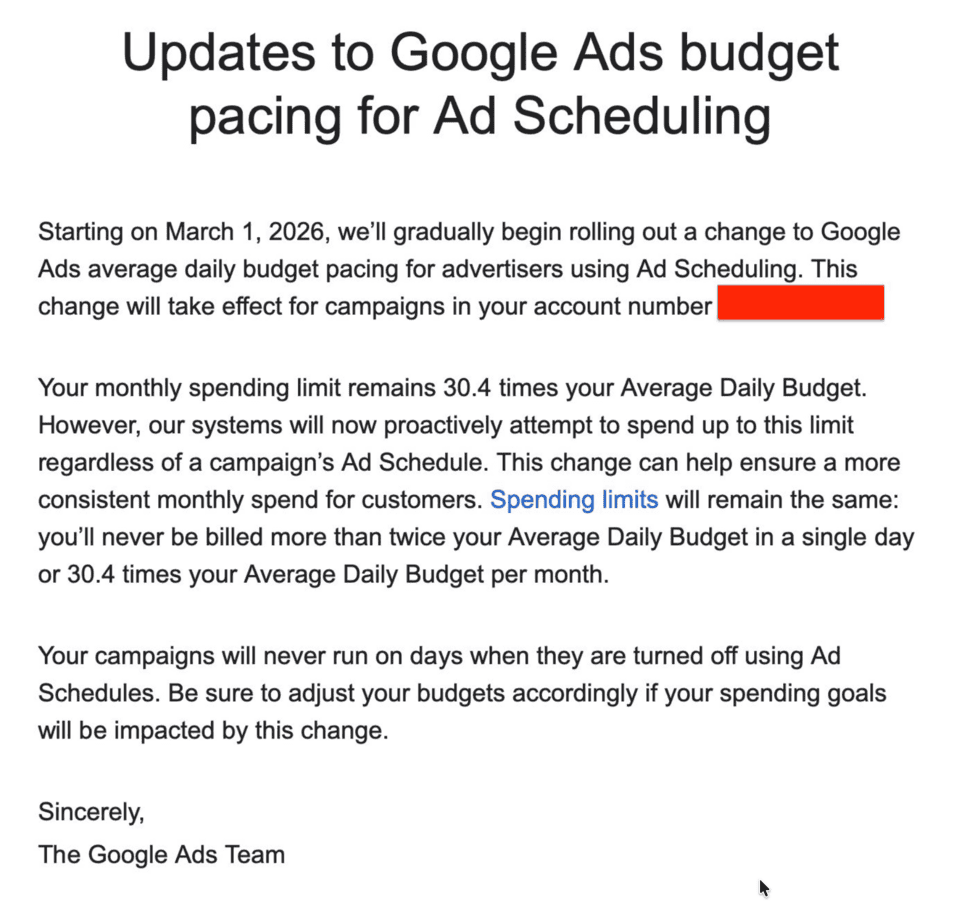
Starting 1 March 2026, there is an update to the budget pacing for ad scheduling that would affect your ad budget and ad performance.

Let me break it down for you.
What is actually changing in Google ads?

Say your daily Google ad budget is $100.

Google is likely to spend up to 30.4 times your daily set budget limit.

That works out to 30.4 × $100 = $3,040.

However, if you were only running ads on weekdays (about 22 days a month), you probably weren’t spending $3,040.

Your adspend was likely closer to $2,200.

Because limiting your ad schedule usually meant you just didn’t hit the full maximmum monthly cap.

However, from March 1st - Google will NOW actively try to spend up to hit $3,040, even if you’re only running ads from Monday to Friday.

So instead of averaging $100 across those weekdays, you’re closer to spending:
$3,040 ÷ 22 ≈ $138 per weekday.

That’s ~38% more spend packed into the same days!

And here’s what actually happens when that happens.

Why changes to Google Ads Budget Pacing for Ad Scheduling matter?

You don’t suddenly get 38% more amazing traffic that will convert!!!

As you have captured your best searches first within your best converting hours with the $100 daily average budget and you are dominating the auctions you’re strongest in, the system now has to find somewhere else to spend this extra 38% more budget!

This results in winning auctions you used to lose - that means showing up for searches that are likely broader in nature but with low chances to convert.

More could be spent during hours that historically convert worse.

That’s where you'll see cost per conversion increasing and decreasing return on adspend.

Before, weekday-only scheduling often meant you naturally underspent the 30.4× cap.

After 1 March, you probably won’t.

If you actually want to only spend $2,200 a month (similar to what you are spending right now), you would want to set your daily budget to:
$2,200 ÷ 30.4 ≈ $72.

Schedules control when you show.
Your daily budget controls how much you spend.

Your takeaway?
Review what you’re actually spending per month. If performance is where you want it, reset your daily budget to reflect your true monthly goal.
Else you'll just be giving Google free money.


If you need a fresh pair of eyes to review opportunities in your Google ads account or minimize wasted adspend, get in touch.
Meet Business Agent: Your Brand’s New AI Helper on Google

When someone searches for your brand name on Google, they often click around or leave if they can’t find answers quickly.

Introducing Google Search AI Helper: Business Agent

With Business Agent, a chat button appears on your brand search, letting shoppers get answers, product recommendations, and guidance - all using your product data and policies.

Why It Matters for Your Ecommerce Business:

This feature provides instant answers, minimizing shoppers' time as they no longer have to click through multiple pages to find their answers.

It also improves your business efficiency by reducing the time your support team (with real people!) spends on answering repetitive questions.

With this new AI helper, the replies to shoppers will also be more consistent in the messaging as all responses reflect your product info and policies.

Where Business Agent Is Available and Who Can Use It:

At the moment, this chat button feature appears on Google Search results when someone googles for your brand name.

However, as this feature is in Early Access Mode, it's only accessible for US businesses with a verified Merchant Center account, a claimed brand profile, and at least 50 approved products.

How to Customize Business Agent in Google Merchant Center Next

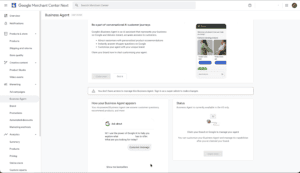
Ecommerce brands with early access can set up Business Agent in Google Merchant Center. You can customize its appearance and manage what it can do.

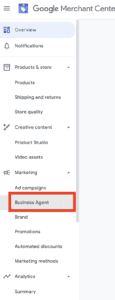
If you have access, you can see it in the menu within Google Merchant Center Next.

google-merchant-center-next-business-agent-ai-helper-on-google-sear

This is how it looks like if you have early access.

Google Merchant Center Business Agent Setup

Areas you can customize include:

  • Setting a welcome message: This will be the first greeting shoppers see when they click on the chat.

  • Crafting conversation starters: Add top prompts to help shoppers start a conversation. This would ideally be common top questions asked by shoppers.

  • Align brand colors with your chat window: Upload your brand logo, choose header/button and background colors that match your brand.

  • Support handoff: Add your support contact info so customers can reach your team if they need extra help.

Performance Insights For Business Agent

Google will be rolling out future performance insights for Business Agent.

So let's keep a close eye on this - if this AI Helper proves valuable in the long run.


If you need a fresh pair of eyes to review your Google ads account for new opportunities or to minimize adspend waste, get in touch to find out how we can help you.

misconceptions-about-google-ads

5 Common Misconceptions About Scaling Google Ads

Are you looking to take your Google Ads to the next level? 

Maybe you've seen some success in your campaigns and now you're ready to scale up. 

But hold on for a second – scaling Google Ads isn't as simple as raising the ad budget and watching the results pour in.

In fact, there are some common misconceptions about scaling that could be holding you back or even hurting your campaigns. 

Whether you're running Google ads for your Shopify or Woocommerce store or you are generating leads for your business,  understanding these key points about scaling Google Ads could be the difference between wasted budget and real, sustainable growth.

In this article, I'm going to uncover the truth about scaling your Google Ads campaigns. 

And at the end of the article, you'll have a clearer picture of what it really takes to scale effectively and efficiently and avoid these common pitfalls.

The 5 misconceptions about scaling Google ads

I'll address the five most common misconceptions about scaling Google ads. These are often oversimplified approaches that are used when trying to expand the reach of ad campaigns. 

I'll use a lemonade stand example to illustrate the flaws in these popular scaling methods. 

Let's examine these misconceptions and learn how to effectively scale your Google ad campaigns to the next level.

Budget Increase Misconception

The first misconception I want to address - is the budget increase misconception.

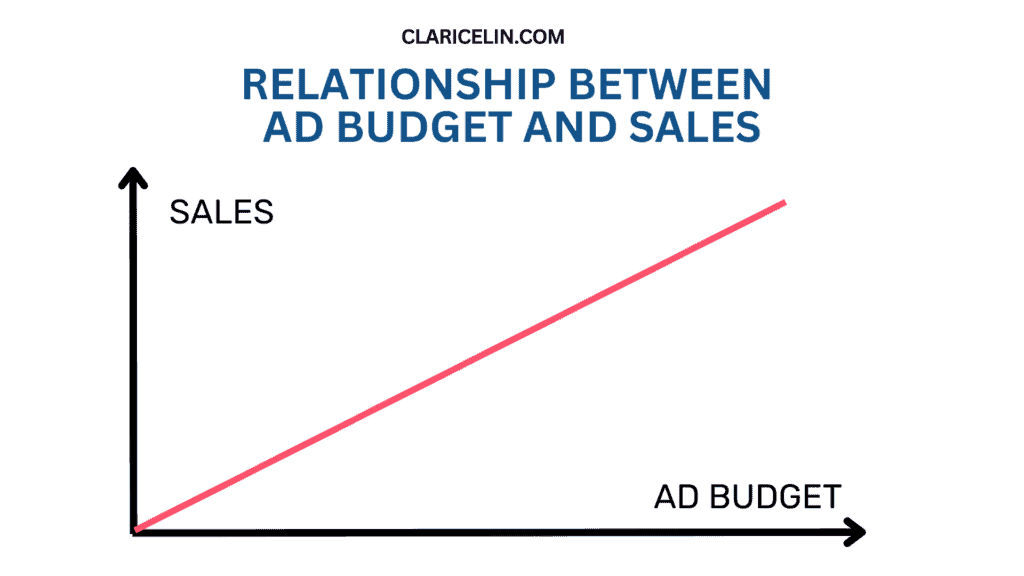
This is a chart of how advertisers commonly view the relationship between ad budget and sales. They assume a linear relationship.

That means when the ad budget is increased, the sales should also increase proportionally.

But does simply increasing your budget guarantee better results?

Of course not! This is why.

Imagine you have a lemonade stand. 

If you're selling out every day, simply buying more lemons won't necessarily double your sales. 

Why?

Because you need to consider a number of factors to make this work.

Demand: 

You need to ensure there are enough people who would buy your increased production of lemonade.

Pricing: 

Even if there are more potential customers, they need to be willing to buy at your current price point.

Competition: 

New sellers might set up nearby, offering lemonade at lower prices. In Google Ads terms, this is like new advertisers entering your market.

Alternatives: 

Competitors might start selling drinks and ice cream, becoming attractive alternatives for potential customers. Similarly, in Google Ads, competitors might target related keywords or create more appealing offers.

Just as with your lemonade stand, scaling Google Ads requires more than just increasing your budget. 

In some cases, if you are looking at a small increase in budget like 10% to 20%,  that could still yield similar results in your campaign.

But if you are looking at doubling your high amount of ad budget or more, you need to consider market demand, pricing strategy, and competitive landscape to ensure effective scaling.

Campaign Setup Misconception

The second misconception I want to address is campaign setup misconception.

Many believe they can scale without changing their original strategy, which can lead to inefficiencies.

Let me elaborate with the same lemonade stand example.

Imagine your lemonade stand has been successful selling 100 cups a day in a local park. You decide to scale up, aiming to sell 1000 cups a day. 

Here's how the misconception might play out:

Initial Setup:

One stand in the park

One flavor: Classic lemonade

Opening hours from 10 AM to 4 PM.

You make and serve all the lemonade yourself

Without a strategy change, you attempt to scale up your operations.

You simply try to make and sell 10 times more lemonade with the same setup.

Problems That Arise:

Supply: You can't squeeze enough lemons by yourself for 1000 cups.

Location Limitations: The park may not have 1000 potential customers per day.

Limited Product Range: Not everyone wants classic lemonade; you're missing out on other potential customers.

Limited Operating Hours: Your current hours might not catch the early morning or evening crowds.

Staffing: You can't serve 1000 customers by yourself without long wait times.

To truly scale, you need to adjust your strategy to make it effective:

Multiple Locations: Set up stands in different high-traffic areas.

Expanded Menu: Offer various flavors and maybe some snacks to also potentially increase average order value.

Extended Hours: Open earlier and close later to catch different customer waves.

Hire Help: Bring on staff to manage increased production and sales.

In this example, before you can truly scale up effectively to serve 1,000 customers, assuming there is customer demand, you'll first need to optimize your business process.

You'd either need to hire more people to help you with faster lemon squeezing and serving and even consider investing in more and better equipment to speed up the process.

Just like the lemonade stand, scaling a Google Ads campaign requires strategy adjustments:

For example, it could be expanding to new, relevant keywords to target a wider group of shoppers.

That's similar to having new locations to sell to more potential customers.

Or creating more ad variations, similar to having new flavors.

Or perhaps adjust ad scheduling, having your ads run at certain times of the day or days of the week. That's just like changing operating hours to catch more people most likely to go past your lemonade store

Or you could tap into automated bidding strategies for Google ads, just like hiring smart assistants to help with your operations.

Another opportunity would be to improve landing pages and conversion paths, just like optimizing the lemonade stand’s processes, offering multiple payment options, catering to customer preferences and enabling faster transactions. 

The key takeaway from this misconception here is: Scaling isn't just about doing more of the same. It requires rethinking and optimizing your entire strategy to handle increased volume efficiently and effectively.

Reach vs Relevance Misconception

The next misconception I want to address about scaling is reach vs relevance. Scaling isn’t just about reaching more people, but reaching more of the right people.

When you are reaching more people, but not everyone is interested to buy from you, you are not getting more sales. 

But if you are reaching more of the right people, you’re more likely to drive sales because they would be interested in your products!

Let me explain with our lemonade business.

Imagine you decide to scale your lemonade business by moving to the busiest intersection in town. You put up huge billboards visible from miles away and hand out flyers to everyone who passes by

As a result, you reach thousands of people daily with your advertising. But many people could be in a hurry, don't like lemonade, or aren't thirsty.

In this scenario, you waste resources on uninterested people!

Sales increase slightly, but costs skyrocket. However, if you are reaching more of the right people, it would be a different story.

Now, imagine you scale by:

  1. Setting up multiple stands in strategic locations:
    • Near a popular hiking trail
    • At a farmers' market
    • Outside a gym
  2. Tailoring your offerings at each location:
    • At the trail: you sell energy-boosting flavors and electrolyte-enhanced options
    • At the Farmers' Market: you offer organic, locally-sourced ingredients
    • At the Gym: you offer Low-calorie and protein-infused varieties
  3. Adjust your marketing message for each audience at each location:
    • At the trail, your sign says: "Refresh and Recharge for the Journey Ahead!"
    • At the Farmers' Market, your sign says: "Taste the Freshness of Local Ingredients!"
    • At the gym, your sign says: "Quench Your Thirst, Fuel Your Workout!"

As a result:

  • you reach fewer people overall, but they're more likely to be interested.
  • you get a higher conversion rate (more sales per person reached) because you are offering items that people at each location are most likely to buy.
  • you achieve better customer satisfaction and repeat business because people get what they want.
  • you are using your resources more efficiently with fewer waste because what you offer gets bought.

And that leads to sustainable growth in sales and profits as the cost you invest becomes generated revenue.

Just as a lemonade stand owner scales effectively by targeting the right locations and tailoring their offering, successful Google Ads scaling isn't about reaching everyone.

It's about reaching and engaging the right audience with the right message at the right time.

How does this relate to Google ads?

If you focus purely on reaching more people, these approaches could be what you are doing.

  • Broadly increasing budget across all campaigns
  • Using only broad match keywords
  • Targeting a wide geographic area
  • Crafting generic ad copy that tries to appeal to everyone
  • Setting up as many campaigns as possible

But if your goal is to reach more of the right people, which is a more effective approach, you would consider these approaches.

  1. Segmentation: Create separate campaigns for different products and services (like different lemonade stands)
  2. Targeted Expansion:
    • Research and add new, relevant keywords
    • Expand to similar audiences and lookalike audiences
  3. Ad Customization:
    • Create tailored ad copy for each segment
    • Use ad customizers and dynamic keyword insertion
  4. Smart Bidding: Utilize automated bidding strategies to target the most valuable clicks
  5. Ad Extensions: Use relevant extensions to provide more information and options to users

With a more targeted approach, you’ll more likely see

  1. A higher click-through rate (CTR) because the people you show your ads to are more likely to click on your ads.
  2. A better Quality Score because Google sees that you are attracting the right people with your ads and rewards you. And that leads to a lower cost-per-click (CPC).
  3. And that obvious means you'll see improved conversion rates.
  4. That ultimately gives you a higher Return on Ad Spend (ROAS).

Just as a lemonade stand owner scales effectively by targeting the right locations and tailoring their offering, successful Google Ads scaling isn't about reaching everyone. It's about reaching and engaging the right audience with the right message at the right time.

Keyword Strategy Misconception

There's often confusion about how to adjust keyword targeting when scaling.

When scaling Google Ads campaigns, many advertisers believe they should simply target broader keywords or drastically increase their keyword list. This is especially so with Google's constant recommendation popping up in the account, recommending to add more keywords.

However, effective scaling requires a more nuanced approach to keyword strategy. It's not simply about adding more.

Let’s go back to our lemonade example. Imagine your lemonade stand started with a simple menu:

  • Classic Lemonade
  • You'll target keywords: "lemonade", "fresh lemonade"

A misguided scaling approach could be you deciding to scale by increasing your offerings:

  1. Broaden your keywords widely:
    • Using these keywords: "drink", "refreshment", "beverage"
  2. Add every remotely related keyword: "summer drinks", "citrus juice", "thirst quencher", "fruit drinks"

As a result, you attract people looking for sodas, alcoholic beverages, or even water. This would disappoint many shoppers when they realize you only sell lemonade and they leave your online store immediately. This means you've just wasted resources on irrelevant traffic and conversion rate drops while costs increase.

However, if you were to be strategic with your keyword selection, you could scale your keyword strategy by 

  1. Expanding your menu thoughtfully with these options, offering multiple lemonade flavors.
    • Classic Lemonade
    • Strawberry Lemonade
    • Sugar-Free Lemonade
    • Sparkling Lemonade
  2. Using a tiered keyword approach:
    • Phrase Match:
      • "homemade lemonade"
      • "best lemonade in [city name]"
    • Exact Match:
      • [freshly squeezed lemonade]
      • [strawberry lemonade]
  3. Including relevant long-tail keywords:
    • "healthy sugar-free lemonade"
    • "sparkling lemonade for parties"
  4. Adding negative keywords:
    • -alcohol, -soda, -beer

As a result, you attract people specifically interested in lemonade and its variations. At the same time, visitors find what they're looking for, improving customer satisfaction. Your resource efficiency improves as you target more relevant traffic and conversion rates increase while costs are better controlled

If we connect this back to Google ads, it's obvious that the misguided approach running ad campaigns would involve using only broad match keywords or adding irrelevant keywords just to increase reach.

And neglecting to use negative keywords would result in clicks from irrelevant search terms, wasting precious adspend.

However, if you are more strategic with your approach, you'll

  1. Expand strategically
    • Add keywords related to new products/services as you scale
    • Use keyword research tools to find related terms
  2. Use keyword match types wisely
    • Leverage on phrase match for more targeted reach.
    • Tap into exact match for high-intent searches.
  3. Build a list of long-tail keywords
    • Target specific, high-intent searches which are often less competitive and more cost-effective.
  4. Build on your negative keywords
    • Continuously refine to exclude irrelevant traffic
  5. Regularly review search terms report
    • Identify new keyword opportunities and potential negatives

When you pick your target keywords more carefully, your ads get more clicks, feel more relevant, score higher in quality, cost less per click, and convert better - which is exactly what we want.

Just as a lemonade stand owner scales effectively by thoughtfully expanding their menu and targeting the right customers, successful Google Ads scaling involves strategic keyword expansion. 

It's not about targeting everyone, but about reaching the most relevant audience with precision.

Cost Misconception

Many people don't anticipate how costs could change as they scale, leading to budget issues.

Many advertisers believe that when scaling their Google Ads campaigns, their costs will increase linearly with their budget increase. 

They often assume that if they double their budget, they'll simply get twice the results at the same efficiency. This misconception can lead to unexpected budget issues and disappointment in campaign performance.

Let’s go back to our lemonade example. If your lemonade stand is doing well, and you are

  • Selling 100 cups per day at $2 each = $2 x 100 = $200
  • Cost per cup: $0.50 (which takes into account the cost of lemons, sugar, water)
  • Total cost = $0.50 x 100 = $500
  • Profit = $500 - $200 = $300 per day

Let’s say if you were to scale up and you aim to sell 1000 cups per day. You'd expect:

  • Revenue: $2000 (1000 cups at $2 each)
  • Total cost: $500 (1000 cups at $0.50 each)
  • Anticipated Profit: $2000 - $500 = $1500

But reality sets in and you realized that

  1. Bulk purchases aren't always cheaper: Some suppliers increase prices for large orders due to strain on their inventory
  2. New Costs Emerge:
    • You need to hire staff to handle the volume of this larger operation.
    • You require larger equipment like juicers and coolers.
    • You may need to rent a larger space or multiple locations.
  3. Competition Reacts to your larger scale operation:
    • Other lemonade stands notice your growth and start lowering their prices.
    • You need to spend more on marketing to stand out.
  4. Diminishing Returns on Location:
    • Your original spot may not have 1000 potential customers.
    • New locations may not be as profitable as your original one.

As a result of this, your actual result:

  • Revenue: $2000 (1000 cups at $2 each)
  • Costs: $1000 (increased costs for staff, equipment, marketing)
  • Actual Profit: $2000 - $1000 = $1000

Now linking back to Google ads scaling, the Google ads misconception often believing that increasing their budget will result in a proportional increase in conversions at the same cost-per-conversion.

But the reality in Google Ads is:

  1. There could be Increased competition for ad space:
    • As you bid on more competitive keywords, costs per click (CPC) could rise. As a consequence, competitors may react to your increased presence by raising their bids.
  2. Audience Saturation:
    • You may exhaust your most relevant audience, leading to targeting of less interested users, which could raise cost per acquisition. This can result in lower click-through rates (CTR) and conversion rates.
  3. Quality Score Changes:
    • Rapid scaling without maintaining ad relevance can hurt Quality Scores. The lower Quality Scores lead to higher cost per click and lower ad positions
  4. New Keyword Territories:
    • Expanding into new keyword areas may have different performance metrics. Some new areas may be less efficient than your original core keywords and could cost more.
  5. Increased Management Complexity:
    • Larger campaigns require more time and potentially tools to manage effectively. You might need to hire agencies or in-house experts, adding to costs

What are the strategies for effective cost management when scaling Google ad campaigns?

Gradual Scaling Approach

Increase budgets incrementally to monitor performance changes. This could be managing each increase by 20% or less. And review the performance regularly.

If the campaign performs well, you can consider increasing by another 20% and so forth.

Campaign Segmentation

Break campaigns into tightly themed ad groups for better control. Organize your keywords by levels of buying intention to better manage your keyword strategy and ad budget allocation. 

For example, someone who searches for “best coffee beans” might not be ready to buy so quickly because they need more time to do more research vs someone who searches for “blue mountain coffee beans from jamaica” and knows exactly what they want to buy and might be ready to buy very soon.

Bid Automation

Utilize smart bidding strategies instead of manual cost per clicks to adapt to changing auction dynamics. This allows your campaign to quickly adjust your bids to get the conversions you are looking for.

Regular Audits

Continuously review and optimize campaign performance to maintain efficiency. Regular audits keep your campaigns sharp and efficient.

By reviewing data on a consistent schedule, you can spot early shifts in performance before they turn into wasted spend. Look at click-through rate to see if your ads still attract attention. Track conversions to check if the traffic you’re paying for is still valuable. Watch the conversion rate to understand if landing pages or audience quality are slipping.

Small, regular adjustments based on these numbers protect your budget and keep results steady.

Expand Campaigns Strategically

Research and test new areas before fully committing budget. Expand campaigns only when the current ones are stable and profitable.

Use data from your best-performing campaigns to guide where to grow next—whether that’s adding new keywords, launching fresh ad groups, or promoting new products. Start small with controlled tests to measure interest and performance.

Once you confirm consistent results, scale gradually and shift more budget toward what works. Strategic expansion keeps growth sustainable without risking your core campaigns.

Final Thoughts: Scaling Google Ads the Right Way

Just as scaling a lemonade stand takes more than buying extra lemons, scaling Google Ads takes more than increasing your budget. The biggest misconception is that growth automatically means better results. In reality, scaling changes how auctions behave, how fast costs rise, and how stable performance stays.

The real skill is managing those shifts - adjusting bids, refining targeting, and expanding only where data proves it’s worth it. That’s how campaigns grow without losing control.

If you need help scaling your Google Ads campaigns the right way, get in touch. We’ll help you grow efficiently, control costs, and turn your ad spend into real business results.

google shopping campaign high cost per click unprofitable

Yes, High Cost Per Click Rates Affect the Profitability of Google Shopping Campaigns: Here's Why & How to Fix it

High Cost Per Click Rates can affect the success of your Google Shopping Ads

In the world of ecommerce and paid advertising, understanding cost per click (CPC) and how it impacts your Google Shopping campaigns is paramount.

In this article, we delve into the relationship between CPC and the profitability of your campaigns, and examine the three bidding Google Shopping strategies.

Towards the end, we'll explore the circumstances in which high CPC doesn't affect your campaigns and when it could signify an unprofitable campaign. We will also suggest ways to rectify campaigns that have been affected by high CPC.

The Importance of Cost Per Click

To maximize the profitability of your Google Shopping campaigns, it's essential to understand how cost per click (CPC) affects your bottom line and adopt the most effective bidding strategies.

Firstly, CPC plays a significant role in determining the success and profitability of your Google Shopping campaigns.

By understanding how this key metric affects your bottom line, you can optimize your bidding strategies to ensure that you're getting the most value for your advertising spend.

When you choose to run Google Shopping campaigns, you don't have to pay when your product ads are surfaced on Shopping results. Rather, you only pay when there is a click on the ad and the user proceeds to your online store.

This payment model is similar to running Google Search ads and that's also why this type of campaign is also sometimes known as a Pay Per Click (PPC) campaign.

Understanding Cost Per Click in Google Shopping Campaigns

CPC is a crucial metric in Google Shopping campaigns.

Although often referred to as the "cost per click" - seemingly representing the amount you pay each time someone clicks on your ad, but in Google Shopping, it's a reflection of the "average cost per click".

This is because the cost for each individual click differs and hugely depend on your chosen bidding strategy.

Aside from the bidding strategy, variables such as industry, location, gender, device, product type and target audience could also influence the average cost per click of a Google Shopping campaign.

Let's explore the three bidding strategies available for your Google Shopping campaigns and see which one best fits your needs:

Diving into Three Google Shopping Bidding Strategies Impacting CPC

Maximize Clicks

This strategy aims to gain maximum visibility for your store by targeting the lowest cost clicks.

Target Return on Ad Spend (tROAS)

Target ROAS is suitable for advertisers who have historical data to identify a specific return goal on their investment.

Each bidding strategy has its unique advantages and limitations, and your choice should depend on your business goals, resources, and preferences.

Remember, there isn't a one-size-fits-all solution. So, test different strategies and fine-tune your approach to maximize your results.

How High CPC Can Impact Your Google Shopping Campaigns

In some cases, a high CPC doesn't impact your campaigns negatively.

For instance, if you sell highly competitive products with high-profit margins, a higher CPC can still result in profitable sales.

If you are unsure, check on your cost per conversion, conversion rates and return on ad spend values.

If those metrics prove to be above your expectations, the cost per click is not a cause for concern and you can keep the campaign running as it is.

However, in other scenarios, a high CPC can signal an unprofitable campaign, particularly when the total cost for clicks exceeds the sales revenue. This is often accompanied by low click-through rates and low conversion rates.

Or when your cost per conversion (sale) proves to be consistently higher than the average order value - that's also a clear indicator of a Google Shopping campaign that's bleeding money.

Fixing Your Google Shopping Campaign with High CPC

If a high CPC is hampering your profit margins, consider revising your bidding strategy:

  1. Adjust your bidding strategy - Review your current strategy and consider switching if it's not generating sufficient sales.
  2. Experiment with different ad schedules - Run your ads at different times to determine if certain periods yield better conversions at lower CPCs.
  3. Exclude negative keywords - By removing exact matched keywords that are unrelated to your store products, Google's algorithm would learn to improve on the focus to identify the right search terms to surface your product ads to.
  4. Optimize your product feed - Enhance your product titles, descriptions, and images to ensure relevance to your targeted keywords. Provide as much attribute details as possible to help Google comprehend your products' benefits and find the right people who are most likely to buy from your store.

Conclusion

Understanding CPC and selecting an appropriate bidding strategy is crucial for the success of your Google Shopping campaigns. While a high CPC might not always indicate a problem, in some instances, it can lead to losses. To mitigate this, consider different bidding strategies, ad schedules, keyword optimization, and product listing improvements to optimize your campaigns.

By taking a balanced approach, you can maintain profitable Google Shopping campaigns while keeping your cost per click in check.

If you require help to profitably scale your Google Shopping campaigns, get in touch for more details.

Latest articles